

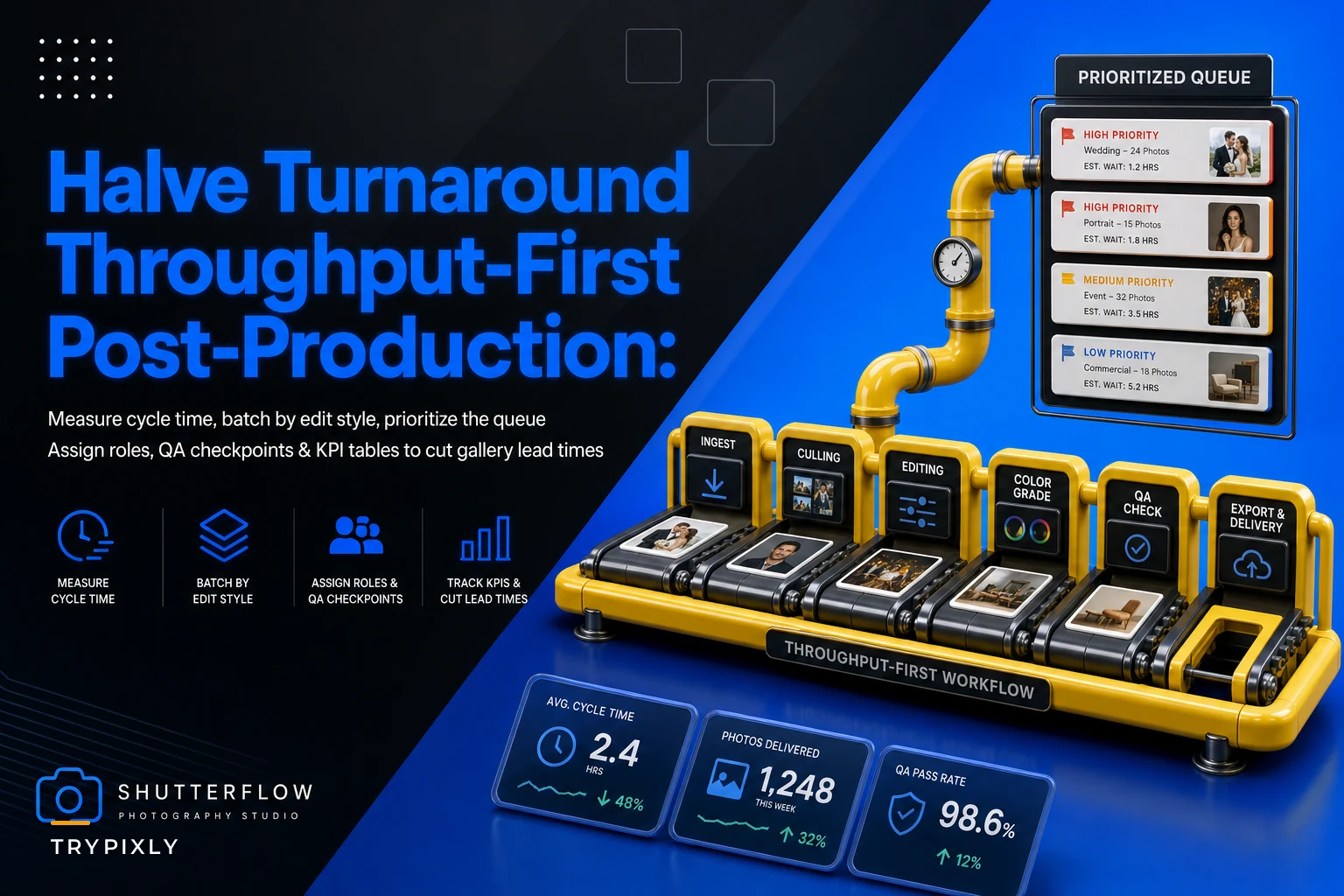
Most studios measure post-production the wrong way. They track how many images got edited, or how many hours the retouchers logged, and then wonder why a wedding shot in early June still hasn't gone out in mid-July. The problem isn't effort. Your team is working. The problem is that nobody is measuring throughput — how fast a gallery moves from ingest to delivery — and without that number, every fix you try is a guess.
This post is about one thing: cutting the clock between "cards are in" and "client gets the link." Not pricing, not client comms, not revision loops. Just the mechanical, boring, high-leverage work of moving galleries through your pipeline faster. If you want to reduce photo retouch turnaround without hiring more editors or lowering quality, throughput is where the money is hiding.
Here's how the delay actually happens, and the exact levers — batching, prioritization, role splits, and a QA gate — that pull turnaround from something like 5 weeks down toward 2.5.
Where the time actually goes (it's not the editing)
In most studios, actual editing accounts for maybe 40% of gallery turnaround time. The rest is waiting.
A typical gallery sits idle in these gaps:
-
Waiting to be culled after ingest (2–4 days)
-
Waiting for the lead to review the cull (1–3 days)
-
Waiting in an editor's queue behind three other jobs (5–9 days)
-
Waiting for a color pass after retouch (1–2 days)
-
Waiting for someone to notice it's done and export it (1–4 days)
Add that up and you've got 10–22 days of pure waiting on a gallery that needs maybe 6–8 hours of hands-on work. The editing was never the bottleneck. The handoffs were.
What shows up across a lot of studio pipelines is that the delay compounds because nobody owns the transitions. An image sits "done culling, not yet assigned" and everyone assumes someone else will grab it. That's the dead zone where turnaround goes to die.
Measure throughput before you touch anything
You can't fix what you're not counting, and hours logged is the wrong count. Track these three numbers per gallery instead:
Never miss a shoot or client detail again.
TryPixly helps you book, confirm, and manage every photography session seamlessly.
- Unified session and client management
- Automated client reminders
- Team calendar & resource scheduling
No credit card required
-
Cycle time — calendar days from ingest to delivery. This is the number your client actually feels.
-
Touch time — actual hours of work performed. Usually way lower than people think.
-
Wait ratio — the gap between the two. If cycle time is 21 days and touch time is 7 hours, you have a wait problem, not a labor problem.
Pull the last 20 galleries and log these. Most studio owners are shocked when the wait ratio comes back at 80%+. That's actually good news, because waiting is far easier to eliminate than editing speed.
A quick way to spot your worst gap: sort galleries by which stage they died in. If eleven of your twenty slowest galleries stalled at "waiting for lead review," you've found your bottleneck, and it's a scheduling problem, not a talent problem.
Batch rules: stop context-switching your editors to death
The single biggest hidden cost in post-production is task-switching. When an editor jumps from a moody wedding gallery to a bright newborn set to a corporate headshot batch inside the same afternoon, they reset their color eye, their skin-tone approach, and their preset stack every single time. That reset costs 15–25 minutes of ramp per switch, and quality drifts.
Batching fixes this, but only if you batch by the right dimension. Batch by edit style, not by client or deadline.
Here's a workable batching structure:
| Batch type | What goes in it | Ideal batch size | Why it works |
|---|---|---|---|
| Warm/portrait | Newborn, family, maternity | 3–4 galleries | Same skin-tone workflow, same warmth curve |
| High-contrast/editorial | Commercial, brand, editorial | 2–3 galleries | Consistent retouch depth, shared reference |
| Event volume | Weddings, corporate events | 1–2 galleries | Cull-heavy, needs sustained focus |
| Quick-turn | Headshots, e-comm on white | 5–8 galleries | Nearly identical, assembly-line friendly |
The rule of thumb: an editor should stay inside one batch type for a minimum half-day block. No switching mid-block unless something is on fire. Studios that enforce this usually see touch time per image drop 20–30% within a few weeks, purely from eliminating the ramp-up tax.
A batch should never sit more than 48 hours waiting to be filled.
One caveat — don't over-batch. If you hold galleries too long waiting to fill a "perfect" batch, you reintroduce the wait problem you were trying to kill. A batch should never sit more than 48 hours waiting to be filled.
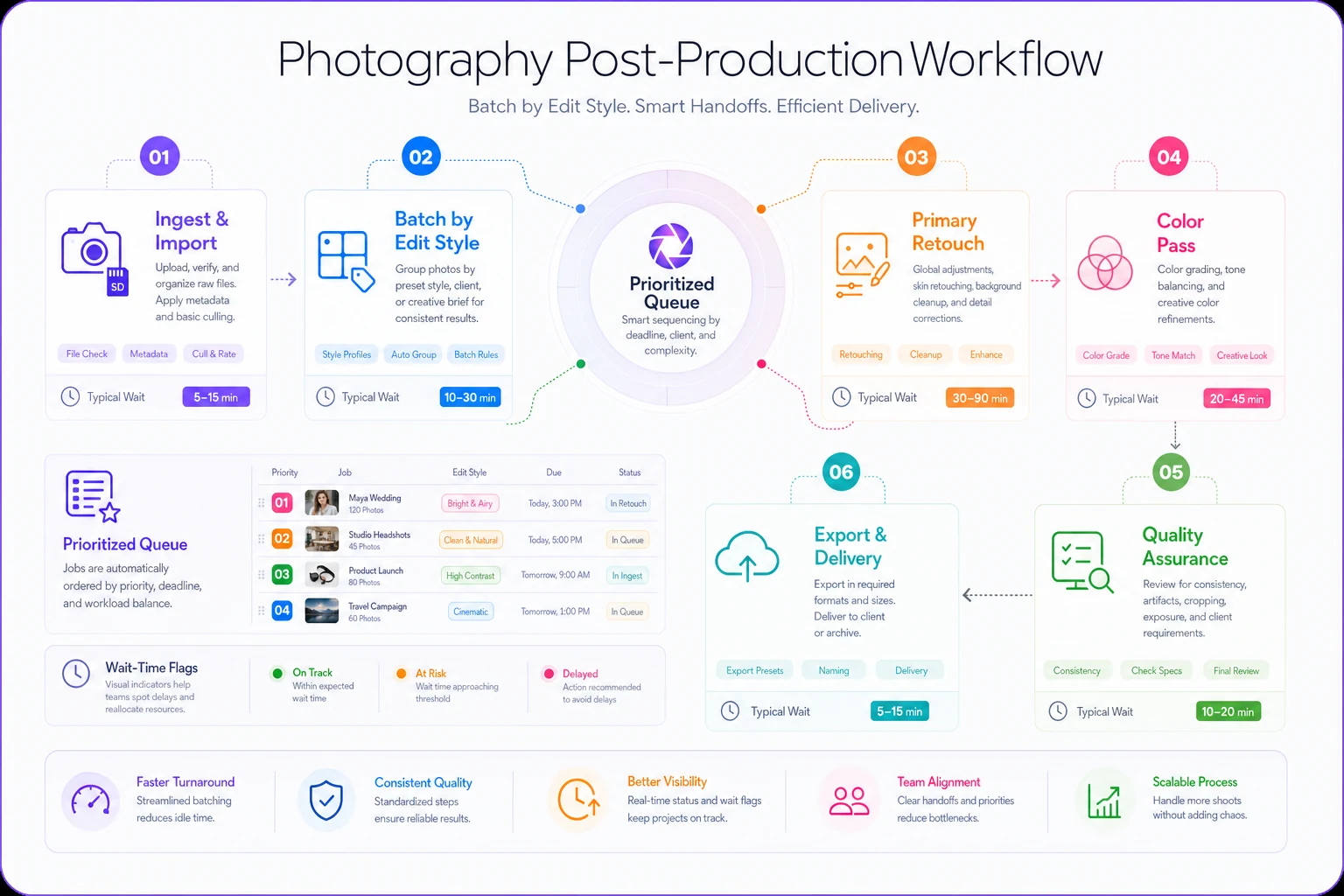
A simple workflow diagram helps teams see where handoffs and waits occur.
The prioritization matrix: which gallery moves first
Most studios prioritize by whoever emails the loudest, or by whatever's closest to its promised date. Both are reactive, and both cause fast jobs to get buried behind slow ones. A simple matrix works better — score each gallery on two axes: deadline pressure and effort required.
-
Low effort + high urgency → do first, always. These are the quick wins that clear queue clutter.
-
High effort + high urgency → schedule into a protected block immediately, assign your strongest editor.
-
Low effort + low urgency → fill gaps with these, use them to top off batches.
-
High effort + low urgency → the trap. These are the galleries that quietly age. Give them a hard start date or they'll rot.
The thing most people miss: low-effort, low-urgency galleries are your secret weapon for throughput. When an editor finishes a block early or hits a natural gap, those quick jobs keep the pipeline flowing instead of leaving dead air. Never let easy work sit just because it's not urgent.
Worth watching — if the same gallery keeps getting deprioritized three cycles in a row, that's a signal. Either it's mis-scoped, missing assets, or something's blocking it. Pull it out and diagnose instead of re-shuffling it again.
Split the roles so nobody is doing everything
Studios with the slowest turnaround almost always have the same setup: one or two "do-everything" editors who cull, retouch, color-correct, QA, and export every gallery start to finish. That feels efficient. It isn't. It creates a single-threaded pipeline where every gallery waits for that one person's full attention.
Break the work into distinct roles, even if the same humans wear multiple hats:
-
Ingest + cull — fast, decisive work. Best done by someone with a good eye who works quickly and doesn't agonize over selects. This role sets the pace for everything downstream.
-
Primary retouch — the deep work. Protected time, minimal interruptions, batched by style.
-
Color + consistency pass — a lighter role that catches drift across a gallery and matches tone. Can often be a mid-level editor.
-
QA + export — the gate. This person doesn't edit; they check. Separating QA from editing is the fastest way to catch mistakes without slowing the editor down.
When culling is decoupled from retouching, your fast culler can clear the intake backlog while retouchers stay deep in their blocks. A gallery moves through four hands across the studio instead of sitting in one person's queue for two weeks.
This ties directly into keeping quality consistent across multiple editors. The throughput gain only holds if everyone's output matches — role splits without calibration just spread inconsistency faster.
A QA checklist that catches problems without adding days
QA is where studios either save themselves or shoot themselves in the foot. Done wrong, it becomes a bottleneck — galleries pile up waiting for the one senior person to approve every image. Done right, it's a fast, standardized gate.
The trick is a binary checklist. Every item is yes/no, no judgment calls, so QA takes minutes per gallery instead of hours:
-
[ ] Exposure and white balance consistent across the full set
-
[ ] Skin tones matched across similar lighting conditions
-
[ ] No missed blemishes/distractions on hero images
-
[ ] Crop and aspect ratios follow the delivery spec
-
[ ] Culling count matches the package promise (no over/under delivery)
-
[ ] Export settings correct (resolution, color space, file naming)
-
[ ] Spot-check 10% of images at 100% zoom for artifacts
-
[ ] Client-specific notes addressed (from shoot brief)
If a gallery fails two or more items, it goes back to the editor with a note. One minor failure, QA fixes it inline. This keeps 90% of galleries moving on first pass and only bounces the genuinely problematic ones. Catching problems before delivery is far cheaper than fixing them after a client complains.
Real scenario: a mid-size portrait and wedding studio
A studio running roughly 25–30 sessions a month across weddings, newborns, and headshots was sitting at a 34-day average turnaround. Editors were maxed out, the owner was about to hire a third retoucher, and clients were starting to show up in reviews.
The audit came back with the usual pattern: touch time per gallery averaged around 6 hours, but cycle time was 34 days. Galleries spent most of their life sitting between stages, not being worked on.
What changed over about six weeks:
-
Split culling off to one fast person, freeing retouchers to stay in deep blocks
-
Enforced half-day style batches, eliminating the constant switching
-
Added the two-axis prioritization matrix so quick jobs stopped getting buried
-
Installed the binary QA checklist so galleries stopped bouncing back over minor stuff
By week six, average turnaround landed around 16 days — roughly half. Touch time barely moved; they didn't get faster at editing. They just stopped letting galleries sit. The third hire got shelved, which saved somewhere in the $40k–$50k range in annual salary they didn't end up needing.
That's the whole point. The throughput was locked up in wait time, not work time.
Where software quietly helps (and where it doesn't)
You can run all of this on a spreadsheet, and plenty of studios do. But the manual version breaks down at the transitions — the exact place turnaround leaks. Somebody has to notice a gallery finished culling and assign it, notice retouch is done and route it to QA, notice QA passed and trigger export. When those handoffs depend on a human remembering, they stall.
A workflow platform with light AI automation earns its keep here — not by editing photos, but by moving galleries automatically through stages, flagging anything that's been sitting too long in a queue, and surfacing wait-ratio numbers without you rebuilding a spreadsheet every month. The automation handles the "who has this now and how long has it been stuck" question so your leads aren't playing air-traffic-control all day.
But be honest about scope. Software won't fix a batching discipline problem or a culler who agonizes over every select. Fix the process first. The tooling just keeps it from decaying back into chaos.
When this playbook makes sense (and when it doesn't)
This makes sense if: you're running enough volume that galleries queue up, you have at least two people touching post, and turnaround is actively costing you reviews or repeat business.
This is overkill if: you're a solo shooter doing 4–5 galleries a month. Your bottleneck is just your own hours, and batching alone will get you most of the way. Don't build role splits for a team of one.
Skip the heavy version if your delays are actually upstream — if galleries are late because shoots run long or briefs are incomplete, no post-production optimization will save you. Fix the intake first.
The bottom line
Slow galleries are almost never a speed problem with your editors. They're a wait problem hiding inside your handoffs. Start by measuring cycle time versus touch time on your last twenty galleries — that one number tells you exactly how much of your turnaround is recoverable. Then batch by style, prioritize by effort and urgency, split the roles so galleries move in parallel, and gate everything through a fast binary QA check.
None of this requires editing faster or working longer. It requires letting galleries stop sitting still.
Slow galleries are almost never a speed problem with your editors. They're a wait problem hiding inside your handoffs. Start by measuring cycle time versus touch time on your last twenty galleries — that one number tells you exactly how much of your turnaround is recoverable. Then batch by style, prioritize by effort and urgency, split the roles so galleries move in parallel, and gate everything through a fast binary QA check.
None of this requires editing faster or working longer. It requires letting galleries stop sitting still.
Ready to elevate your studio’s workflow?
Join 500+ studios using TryPixly to save time, reduce scheduling conflicts, and deliver exceptional client experiences.