


The revision email hits differently when you realize those 47 images represent 14 hours of retouching work that's now worthless. Not because your retoucher suddenly forgot how to do their job, but because somewhere between the initial brief and final delivery, the standards shifted, expectations morphed, and nobody caught it until everything was already done.
Photography studios lose somewhere between 20-35% of their retouching capacity to unnecessary revisions. That's not really a workflow problem—it's a standards problem wearing a workflow problem's clothing.
The expensive gap between "looks good" and "deliverable ready"
Most studios treat retouching QA like checking for typos in a document. Quick scan, looks fine, send it. But retouching standards drift in ways that compound invisibly until you're staring at a folder full of unusable work.
A wedding photographer I worked with in Phoenix figured out their revision problem wasn't actually about revisions at all—their lead retoucher and junior retoucher had completely different interpretations of "natural skin smoothing." The lead was delivering magazine-quality smoothing. The junior was barely touching skin. Both genuinely thought they were following the studio standard.
Client complaints came in randomly. Some loved the polished look. Others felt their photos looked fake. The studio was burning 8-10 hours per wedding package on revision cycles alone, not counting the relationship damage from wildly inconsistent delivery.
A few patterns tend to create this mess:
Standards exist only in someone's head. "Make it look natural" means something different to every retoucher on your team. Without visual references and measurable benchmarks, you're just hoping everyone shares the same aesthetic intuition.
The approval chain breaks at handoffs. Your lead photographer reviews composition. Your studio manager checks quantity. Your retoucher handles color and skin. But nobody owns the complete standard from capture to delivery.
Revision allowances become revision expectations. Include three rounds of revisions in your package and clients will use all three—not because they need them, but because the framing implies the first delivery probably won't be right.
The real damage shows up in your P&L. A portrait studio doing 40 sessions monthly with an average of 2.3 revision rounds per session is essentially running a second, unprofitable retouching operation just to fix work that shouldn't have needed fixing in the first place.
Building a retouching QA workflow that catches problems before delivery
The difference between studios that ship once and studios that revise endlessly comes down to how they define "done."
Never miss a shoot or client detail again.
TryPixly helps you book, confirm, and manage every photography session seamlessly.
- Unified session and client management
- Automated client reminders
- Team calendar & resource scheduling
No credit card required
Start with deliverable-ready standards, not quality guidelines. Instead of "skin should look natural," you need something like "frequency separation at 15-20%, dodge and burn variance not exceeding +/- 0.3 stops, color cast correction within 200K of baseline."
Those aren't arbitrary numbers—they're measurable checkpoints that remove interpretation from the process.
The three-gate approval system
Gate 1: Technical Standards
-
Color accuracy (measured against calibrated reference)
-
Exposure consistency across set
-
Resolution and export specifications
-
File naming and organization
Gate 2: Aesthetic Standards
-
Retouching depth matches package level
-
Style consistency with portfolio examples
-
Brand guidelines adherence
-
Special requests implementation
Gate 3: Client-Ready Standards
-
Package completeness
-
Print specifications verified
-
Digital delivery formats confirmed
-
Revision allowance documentation
Each gate needs a different reviewer with specific expertise. Your colorist shouldn't be checking file organization. Your studio manager shouldn't be evaluating skin retouching depth.
A quick visual of the three-gate approval flow.
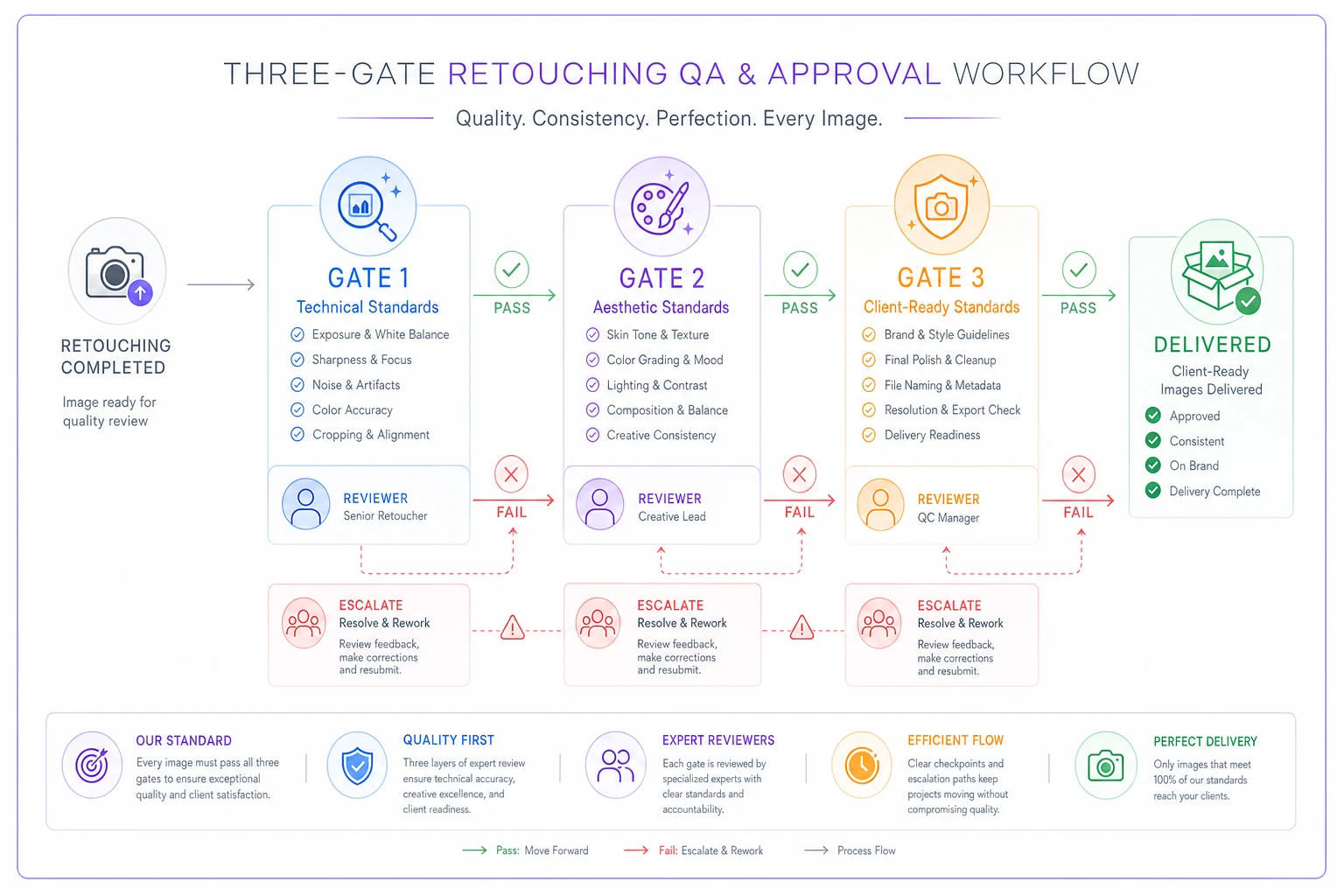
Use this visual to align your team around who owns each handoff.
Revision allowances that protect profitability
Unlimited revisions kill studios slowly. Being too stingy with revisions kills client relationships quickly. The sweet spot is structured allowances tied to package tiers.
Package-based revision structures that tend to work:
Basic Package: One Round, Five Images
-
Client selects five images for revision
-
All revisions submitted together
-
48-hour turnaround
-
Additional rounds at hourly rate
Standard Package: Two Rounds, Full Set
-
First round
unlimited images
-
Second round
20% of total images
-
72-hour turnaround per round
-
Style changes count as new project
Premium Package: Three Rounds, Priority Processing
-
Comprehensive first round
-
Refined second round
-
Polish third round
-
24-hour turnaround
-
Dedicated retoucher consistency
The key isn't really the number of rounds—it's the decreasing scope with each one. First round catches real issues. Second round handles preferences. Third round is minor polish. This natural taper prevents the endless loops that eat into margins.
Automated reminders that prevent deadline disasters
Manual follow-up on retouching approvals is where studios bleed time. You're chasing clients for feedback while deadlines creep up, then rushing corrections when they finally respond three days before their event.
The automation sequence that actually works:
-
Day 1 post-delivery Initial review notification with clear deadline
-
Day 3 Friendly reminder with direct approval link
-
Day 5 Deadline warning with revision policy reminder
-
Day 7 Final notice before automatic approval
-
Day 8 Project marked approved, revision window closes
Most studios miss an important nuance here—you need different sequences for different client types. Corporate clients need formal notifications with project numbers. Wedding clients respond better to personal messages with preview images attached. Portrait clients usually just need gentle nudges with scheduling implications.
A studio in Denver cut their average approval time from 11 days down to 4 by adding preview thumbnails directly to their reminder emails. Clients could see their images without logging into a gallery, which removed enough friction to actually prompt feedback.
Add preview thumbnails directly to reminder emails to reduce friction and speed approvals.
The automation sequence should be tailored to client type and expectations to avoid last-minute crunches.
The escalation matrix that ends decision paralysis
Some revision requests are straightforward. "Make the sky bluer." Done. Others create cascading complexity that nobody wants to own. "Make me look younger but not fake." That's when you need an escalation matrix.
An escalation decision matrix should answer three questions:
-
Who decides if this revision is included or billable?
-
Who determines if the request is technically possible?
-
Who approves scope changes that affect delivery dates?
A working matrix structure:
| Revision Type | Decision Owner | Escalation Path | Time Limit |
|---|---|---|---|
| Color/exposure adjustment | Junior retoucher | Lead retoucher → Studio manager | 2 hours |
| Retouching depth change | Lead retoucher | Creative director → Client meeting | 4 hours |
| Style/aesthetic shift | Creative director | Studio owner → New contract | 24 hours |
| Technical impossibility | Lead retoucher | Studio manager → Client education | Same day |
| Scope expansion | Studio manager | Owner → Change order | Next day |
The time limits matter more than the titles. Every revision request needs a decision deadline or it just sits in limbo while your retoucher waits for direction and your client waits for images.
How quality assurance software changes the revision game
Traditional retouching QA means someone manually checking every image against a mental checklist. It's slow, inconsistent, and entirely dependent on whoever happens to be doing the checking that day.
AI-powered QA platforms can scan hundreds of images in minutes, flagging technical issues like color casts, exposure inconsistencies, and export errors before human review even begins. But the real value isn't in the scanning speed—it's in the standardization.
When your QA parameters are defined in software, every image gets checked against the same objective targets. Your Tuesday retoucher and your Friday retoucher are working toward identical technical benchmarks. The software becomes the source of truth that eliminates interpretation gaps between people.
There's also a feedback loop benefit most studios don't think about. Instead of vague client complaints arriving three days after delivery, retouchers get specific, measurable feedback immediately after processing. That's how standards actually improve over time instead of slowly drifting toward whatever's easiest to get out the door.
The proof is in the reduction
A commercial photography studio in Austin implemented this framework—defined standards, three-gate approvals, package-based revisions, automated reminders, escalation protocols. Their revision metrics shifted pretty significantly over four months:
Before:
-
Average revision rounds
2.7 per project
-
Revision time per project
6.4 hours
-
Client approval time
9 days
-
Profit margin on retouching
-12% (losing money)
After (four months later):
-
Average revision rounds
1.2 per project
-
Revision time per project
1.8 hours
-
Client approval time
3.5 days
-
Profit margin on retouching
34%
The biggest mindset shift was treating revisions as preventable failures in their QA process rather than an inevitable part of the job.
Who needs this level of QA structure (and who doesn't)
This framework makes sense if you're handling more than 20 retouching projects monthly, working with multiple retouchers, or watching revision requests eat into your margins. It's especially relevant for studios doing high-volume event photography, commercial work with strict brand guidelines, or portrait studios managing multiple package tiers.
Skip it if you're a solo photographer who personally handles all retouching, works with fewer than 10 clients monthly, or primarily does artistic projects where subjective interpretation is actually part of the value. The overhead won't pay off at that scale.
The studios that benefit most are stuck in the middle—too big to personally quality-check everything, too small to have dedicated QA staff. That's exactly where systematic workflows and smart automation fill the gap between solo operation and enterprise structure.
Moving from reactive fixes to proactive quality
Studios still drowning in revision cycles usually share one trait: they treat quality assurance as damage control rather than damage prevention. They check work after it's done, catch problems after delivery, fix issues after complaints.
The shift to proactive QA isn't about working harder. It's about checking smarter, earlier, and more consistently. When standards are clear, approvals are structured, and escalation paths are defined, revisions become rare exceptions instead of routine expectations.
Your retouching workflow should produce deliverable-ready work on the first pass—not because your retouchers are perfect, but because your process catches imperfections before they become client problems. That's how you protect both quality and margins in a business where perception is everything and the room for error is small.
The question isn't whether you need better retouching QA. It's whether you can afford to keep fixing the same preventable problems while your competitors ship once and move on to the next paying project.
Ready to elevate your studio’s workflow?
Join 500+ studios using TryPixly to save time, reduce scheduling conflicts, and deliver exceptional client experiences.