



Your photographer just texted you at 11pm. They can't handle another back-to-back newborn session tomorrow. But you've got three families booked, a corporate headshot group at 2pm, and somehow double-booked your largest shooting space for a maternity session that requires your full backdrop setup.
This isn't a booking software problem. It's a capacity planning failure — and photography studios keep making it because they treat scheduling like a calendar exercise instead of an operational constraint system.
Why photography studios burn through profit treating capacity like it's infinite
Studio capacity planning breaks differently than other service businesses. A hair salon can add another chair. A restaurant can squeeze in another two-top. But photography studios deal with physical constraints that compound: limited shooting spaces, specific equipment setups, photographer energy levels that affect quality, and post-production backlogs that create invisible capacity walls weeks after the session ends.
Most studio owners discover these constraints the hard way. They see an open slot and book it. Then another. Then they realize their main photographer is shooting 7 sessions on Saturday, the editing team is 3 weeks behind, and clients are waiting on galleries because nobody tracked downstream capacity.
The real damage happens in phases. First, quality drops when photographers rush through sessions. Then staff starts calling out — usually your best people, who get overworked first. Client complaints increase. Your Google reviews take a hit. By the time you notice the pattern, you've trained clients to expect delays and trained staff to expect chaos.
What kills profitability isn't the obvious stuff like equipment costs or rent. It's the hidden operational tax of running above true capacity: rush fees to editors, overtime pay, remake sessions when quality drops, and the slow bleed of loyal clients who quietly book elsewhere next time.
The four capacity constraints that actually matter
Physical space creates your first hard limit. Not just "do we have a room available" but the actual operational capacity of each space. Your main studio might handle 6 sessions daily if they're all headshots. Throw in one newborn session that needs 90 minutes of setup and temperature adjustment, and suddenly you're down to 4 sessions max.
Never miss a shoot or client detail again.
TryPixly helps you book, confirm, and manage every photography session seamlessly.
- Unified session and client management
- Automated client reminders
- Team calendar & resource scheduling
No credit card required
Photographer capacity is more complex than hours available. A photographer can shoot corporate headshots for 6 hours straight and stay sharp. Newborn sessions are different — the physical positioning, the patience, the precise lighting adjustments wear on people in a specific way. Most photographers hit quality degradation after 2 or 3 newborn sessions, regardless of how much time there is between them.
Equipment constraints hide until they don't. That specific portrait lens? You've got two. Fine — until three photographers need them at the same time. The portable lighting kit for on-location work? Nobody tracks when it's off-site, so you find out there's a conflict when someone's already packing their car.
Post-production capacity creates phantom overbooking weeks later. You can book 50 sessions this week. But if your editing team handles around 30 weekly, you've just created a 20-session backlog that compounds until something breaks — usually client satisfaction or editor retention.
Building a finite-capacity scheduling framework that actually works
Here's what a functional studio capacity planning system looks like once you stop pretending resources are unlimited.
Start with session-type capacity units, not time slots. A newborn session isn't just 2 hours — it's 2 hours of studio time, 3 hours of photographer energy, 4 hours of editing capacity, and specific equipment that can't be shared. Build a capacity unit table:
| Session Type | Studio Units | Photographer Units | Editor Units | Equipment Lock |
|---|---|---|---|---|
| Newborn | 2.5 | 3 | 4 | Full portrait kit |
| Family Portrait | 1.5 | 1.5 | 2 | Portable kit OK |
| Corporate Headshot | 0.5 | 0.5 | 0.5 | Basic setup |
| Maternity | 2 | 2 | 3 | Full portrait kit |
Now track daily capacity budgets, not just availability. If your senior photographer has 8 energy units per day, they can shoot 2 newborns and one family session. Or 16 headshots. But not 4 newborns, even if the calendar technically has time.
Build in buffer rules between session types. A newborn session needs 45-minute buffers for temperature adjustment and setup changes. Headshots need 15 minutes for basic resets. Mini sessions during busy season need 30-minute buffers every 4 sessions for photographer breaks and equipment checks.
The shift-level capacity system prevents the "Thursday problem" — when everything gets crammed into specific popular slots. Morning shifts get different capacity limits than afternoon or evening. A Saturday morning might have 6 photographer units available across your team. Saturday evening might have 3. Build the actual map:
Monday–Wednesday:
-
Morning
4 photographer units
-
Afternoon
6 photographer units
-
Evening
2 photographer units
Thursday–Friday:
-
Morning
6 photographer units
-
Afternoon
8 photographer units
-
Evening
4 photographer units
Saturday:
-
Morning
8 photographer units
-
Afternoon
6 photographer units
-
Evening
3 photographer units
This prevents the classic mistake of accepting 5 Saturday morning newborn bookings when you only have capacity for 2.
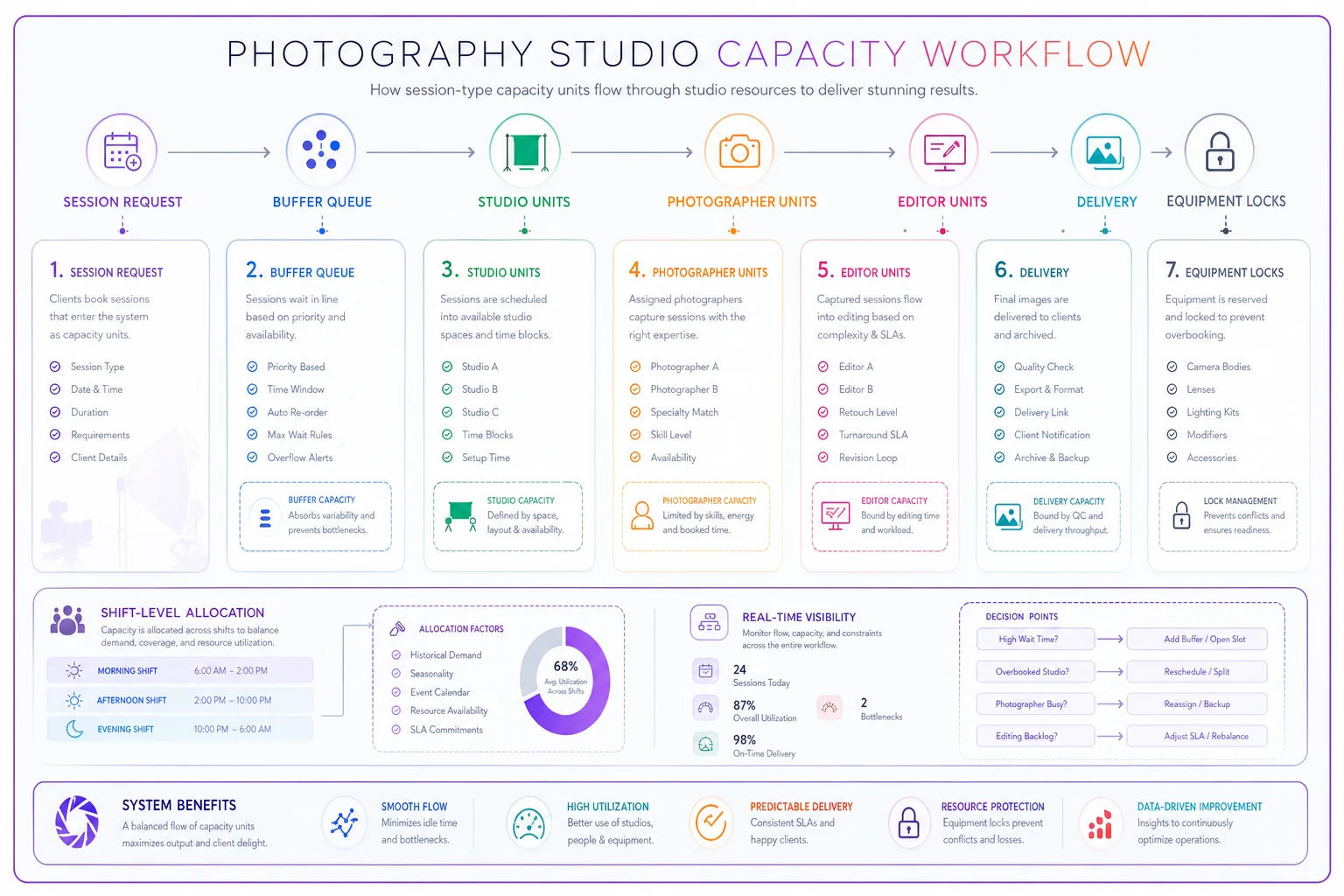
This diagram shows how session-type capacity units flow through studio, photographer, equipment, and editing stages.
The seasonal horizon planning most studios skip
Photography has predictable seasonal patterns that studios ignore until they're drowning. Fall family portraits, spring graduations, December holiday cards — these aren't surprises. But studios treat them like unexpected surges instead of plannable capacity crunches.
Map your seasonal capacity needs at least 90 days out. October needs around 40% more family portrait capacity than July. December needs 60% more studio time for holiday mini sessions. April needs double the graduation portrait capacity of any other month.
What studios miss: seasonal surges affect different capacity types differently. Fall family portraits strain photographer capacity but spread editing over weeks. Holiday mini sessions create massive editing backlogs in 72-hour bursts. Graduation season hits equipment constraints when everyone needs outdoor lighting kits simultaneously.
Build capacity multipliers for each season:
Fall Family Portrait Season (Sept–Nov):
-
Photographer capacity
1.4x normal
-
Editing capacity
1.6x normal
-
Weekend studio capacity
2x normal
-
Equipment needs
1.2x normal
Holiday Mini Season (Nov–Dec):
-
Photographer capacity
1.8x normal
-
Editing capacity
2.5x normal
-
Studio capacity
2x normal
-
Equipment needs
1x normal (all indoor)
This tells you that holiday season needs contract editors, not just contract photographers. Fall needs weekend studio space, maybe a rental location. Graduation season needs equipment rentals, not more staff.
Analytics that reveal where capacity really breaks
Track capacity utilization, not just bookings. A 90% booked calendar might mean 110% capacity utilization if you're heavy on newborn sessions — or 70% if it's mostly headshots. The utilization rate tells you if you're actually full or just look full.
Monitor constraint violations weekly. How often did you book overlapping equipment needs? How many times did photographer units exceed daily limits? When did editing backlogs force rush fees? These aren't just problems — they're data showing where your capacity model is wrong.
A violation log might look like:
-
Week 1
3 equipment conflicts (portrait kit)
-
Week 2
2 photographer overages (Saturday morning)
-
Week 3
5-day editing backlog
-
Week 4
Emergency contractor for overflow
That pattern tells you exactly what to fix — another portrait kit, Saturday morning coverage, and permanent editing capacity. Not just "more staff."
Build load distribution reports showing where capacity clusters. You might find 70% of bookings pile into 30% of your available slots. Tuesday mornings are dead. Saturday afternoons are triple-booked. That's usually bad capacity pricing or availability messaging, not client preference.
Setting booking limits that protect profit margins
Static booking limits fail because demand fluctuates. A hard "10 sessions per day" rule leaves money on the table during slow season and burns out staff during busy periods. Dynamic limits based on capacity units flex with reality.
Set package-mix constraints, not just session counts. You can handle 8 family sessions on Saturday. Or 3 newborns. Or 2 newborns plus 3 families. But not 5 newborns, even though that's fewer than 8 total sessions. The system has to track package-specific capacity consumption.
Create cascade rules for high-revenue sessions. A $3,000 wedding party portrait booking should bump a $400 family session to Sunday — but only if Sunday has capacity, and only if the family session hasn't been confirmed for more than 14 days. The rules get complex fast, which is exactly why manual tracking fails.
Buffer availability based on historical patterns. If 30% of your October bookings typically come in the last week of September, hold back about 20% of October capacity until September 20th. This stops early-bird clients from locking up all the prime slots while procrastinating big spenders get shut out.
The actual cost of overbooking versus idle capacity
Studios obsess about idle slots but undercount overbooking costs. An empty Tuesday afternoon costs potential revenue. An overbooked Saturday that forces overtime, rush editing, and photographer burnout costs significantly more.
The math on an overbooked day:
-
Overtime pay
$200
-
Rush editing fees
$150
-
Quality issues requiring reshoots
$800
-
Staff turnover from burnout
~$3,000 (hiring and training)
-
Client churn from delays
~$2,000 (lifetime value)
That's roughly $6,150 versus $400 for the idle Tuesday. Yet studios keep choosing overbooking because the empty slot feels worse in the moment.
Smart capacity planning accepts strategic idle capacity. The target isn't 100% utilization — for most studios, optimal is somewhere around 85%.
Practical capacity planning implementation
Start with a 2-week capacity audit. Track every session: who shot it, what equipment it used, how long editing took, when clients received galleries. Include setup and breakdown time. Note when photographers seemed tired or rushed. Document equipment conflicts and space constraints.
You'll probably find patterns — photographers hitting quality issues after 4 sessions, certain session types always running long, editing bottlenecks on specific gallery types. One studio found their maternity sessions consistently needed 40% more editing time than estimated. Another discovered their second shooting space was effectively unusable for newborns due to temperature control issues, cutting their newborn capacity by 40%.
Build your capacity unit model from real data, not estimates. If newborn sessions average 2.5 hours including room prep and breakdown, that's your unit. If photographers need 30-minute breaks after infant sessions, build it in.
Test the model against your next month's bookings before going live. Would your planned schedule violate capacity constraints? A portrait studio with 4 photographers once ran this test against their December plan and found 15 capacity violations — mostly equipment conflicts and editor overload in the week before Christmas.
The fix wasn't hiring more staff. It was shifting mini-session dates to spread editing load, renting additional lighting kits for the surge week, and adding capacity-based pricing that moved some demand to off-peak slots.
When capacity planning makes sense (and when it doesn't)
This level of systematic planning makes sense once you hit real operational complexity. Solo photographer shooting 10 sessions a month? A simple calendar works fine. But there are specific signs you've outgrown it:
-
Multiple photographers sharing resources
-
40+ sessions monthly across varied types
-
Consistent overtime or rush fees
-
Staff turnover citing workload or chaos
-
Client complaints about delays
-
Regular equipment or space conflicts
Studios doing primarily on-location work need different capacity models than studio-based operations. A high-school senior portrait business has different seasonal patterns than a newborn specialty studio. Don't implement complex capacity frameworks if your main constraint is demand, not operations. Fix the demand problem first.
Building dashboards that prevent capacity disasters
Real-time capacity visibility prevents most problems. But studios typically can't see capacity until it's blown — they see a booked calendar, not remaining capacity units. They see today's schedule, not next week's brewing editing catastrophe.
Build three capacity views:
The daily capacity dashboard shows remaining units by type for the next 14 days. Not just "slots available" but "can accept 2 more newborns" or "headshot capacity full, portrait capacity available." This prevents booking mismatches.
The weekly load forecast projects capacity consumption for the next 4 weeks. Include downstream impacts — sessions booked this week that create editing load next week. This surfaces future bottlenecks while you can still do something about them.
The constraint violation alert system flags problems before they hit. When someone tries booking a fourth newborn on Saturday, it alerts. When editing backlog projections exceed capacity by 20%, it notifies. When equipment conflicts emerge, it blocks the booking.
Modern AI-powered operational software handles this tracking automatically. Rather than manually juggling dozens of constraints across spreadsheets, the platform monitors capacity consumption in real-time, predicts bottlenecks from booking patterns, and suggests slot alternatives that balance load across the system. It can also learn your studio's actual patterns — like which photographers can handle more intensive session loads — and adjust limits based on real performance, not theoretical estimates.
Recovery protocols when capacity planning fails
Even solid capacity planning breaks sometimes. A photographer calls in sick. A corporate client adds 20 headshots to their booking day-of. The editing computer crashes during busy season. The recovery protocol determines whether these disruptions become disasters.
Build triage rules for capacity overflow. A newborn session for a family flying in can't move. A local family portrait might shift to next weekend. Corporate headshots with 50 employees scheduled can't move. A single professional headshot might.
Create overflow capacity agreements ahead of time. Partner studios who can take emergency sessions. Contract photographers on standby. Overflow editing services with pre-negotiated rates. These agreements need to be operational — detailed handoff protocols, quality standards, file delivery specs. Not just "call if needed."
Document cascade failure protocols. If Saturday is overbooked by 4 capacity units, what's the sequence? First, offer incentives to move flexible bookings. Second, bring in a contract photographer if available. Third, extend studio hours if possible. Fourth, senior staff shoots overflow. Fifth, partner studio takes specified session types.
Why manual capacity tracking always fails eventually
Spreadsheets handle simple capacity tracking initially. But photography studios have too many variables for manual tracking at any real scale. Session types, photographer skills, equipment availability, space constraints, editing backlogs, seasonal patterns — the complexity compounds fast.
Manual systems also fail at the edges. They track that you have 2 portrait photographers working Saturday. They don't track that one specializes in newborns and the other doesn't. They show studio space is available. They don't show it needs 2 hours of conversion setup from the previous session type.
The failure usually creeps in gradually. Occasional double bookings, then equipment conflicts, then editing backlogs nobody saw coming. By the time you realize manual tracking isn't working, you're already deep in operational chaos with unhappy clients and burnt-out staff.
AI-powered operational software changes this. Instead of manually tracking dozens of constraints, the system monitors capacity consumption automatically, flags conflicts before they occur, and surfaces optimal booking arrangements that account for all constraints at once. Over time, it builds an accurate picture of your studio's real patterns — not the idealized version you built the spreadsheet around.
Capacity planning as competitive advantage
Most photography studios compete on quality, price, or marketing. Operational discipline through systematic capacity planning creates a different kind of moat. You can offer better availability than competitors drowning in chaos. You maintain quality when others cut corners from overbooking. Your team stays energized while theirs burns out.
The studios thriving long-term aren't always the most talented or the best marketed. They're the ones who treat capacity as a strategic asset. They prevent problems instead of fighting fires. They protect margins through operational discipline, not just pricing power.
Building this takes real work upfront. Mapping capacity units, creating constraint rules, establishing buffer protocols — none of it is automatic. But the payoff compounds. Fewer crises, happier staff, better client experiences, and higher profitability even during the demand surges that crush less-prepared competitors.
The question isn't whether you need systematic studio capacity planning. It's whether you'll build it proactively or wait until operational chaos forces your hand.
Ready to elevate your studio’s workflow?
Join 500+ studios using TryPixly to save time, reduce scheduling conflicts, and deliver exceptional client experiences.