


The uncomfortable truth about how most photography package pricing gets built: it starts with a competitor's rate, a gut feeling, or whatever the studio charged three years ago plus a small bump. The actual cost of delivering that package — the slot it occupies, the retouching hours, the print fulfillment, the drive time — almost never gets calculated first. So studios end up with a menu where one package quietly subsidizes another, and nobody notices until margins get thin during a slow quarter.
This post is about fixing that specific problem: building a pricing framework where every package is anchored to what it actually costs your studio to produce, then layered with perceived value and discount rules that don't erode your margin by accident. Not a pricing philosophy. An operational one, with the worksheets and the math.
Start with cost-per-slot, because your calendar is your real inventory
A studio doesn't sell photos. It sells time in a finite calendar. Every session eats a slot — the shooting block plus the buffer, plus the post-production hours it triggers downstream. If you're not pricing off that unit, you're guessing.
Cost-per-slot is the number that anchors everything else. To build it, you need your fully-loaded monthly operating cost divided by your realistic bookable slots — not theoretical maximum slots, realistic ones after buffers, admin time, and the days nobody books.
A typical example looks like this. Say a single-photographer studio runs monthly costs like:
| Cost bucket | Monthly amount |
|---|---|
| Studio rent + utilities | ~$2,400 |
| Owner draw / photographer labor | ~$4,500 |
| Software, insurance, subscriptions | ~$650 |
| Marketing | ~$800 |
| Gear depreciation + maintenance | ~$400 |
| Total | ~$8,750 |
Now the calendar. Say the studio can realistically shoot around 45 sessions a month once you strip out buffers and dead days. That's roughly $194 per slot just to keep the lights on and pay the shooter — before a single print, album, or hour of retouching.
That $194 is your floor. Any package that occupies a slot has to clear it comfortably, or it's not a package — it's a donation. Most owners are genuinely surprised by this number the first time they run it, because they've been comparing their $250 mini-session to a competitor's $250 mini-session without realizing theirs barely breaks even.
Worksheet — Cost-per-slot:
-
Add all fixed monthly costs (rent, insurance, software, base labor).
-
Add variable monthly costs that don't scale per-session (marketing, admin).
-
Total those = your monthly operating base.
-
Count your realistic bookable slots per month (not max capacity).
-
Divide base by realistic slots = cost-per-slot floor.
The mistake here is using max capacity in step 4. If you divide by 70 theoretical slots when you actually book 45, your cost-per-slot looks artificially cheap and you'll underprice everything. Use the number your calendar actually produces.
Use this simple workflow to calculate cost-per-slot and keep it handy when mapping package prices.
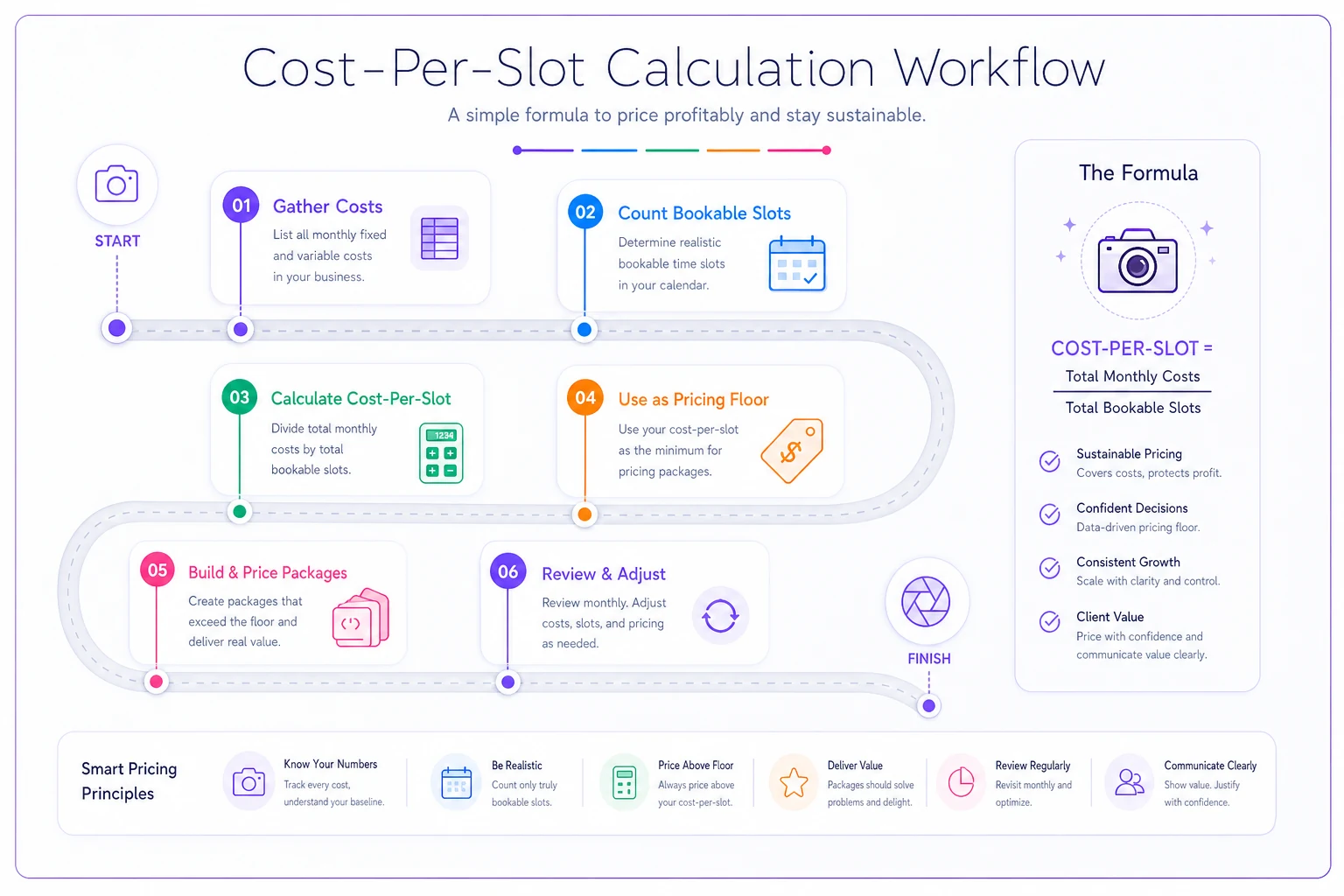
This visual shows the calculation flow from monthly costs to per-slot floor.
Map deliverable cost separately — it's not part of the slot
The slot pays for shooting time and overhead. Deliverables are a second cost layer that varies wildly by package and gets ignored constantly.
Never miss a shoot or client detail again.
TryPixly helps you book, confirm, and manage every photography session seamlessly.
- Unified session and client management
- Automated client reminders
- Team calendar & resource scheduling
No credit card required
A newborn session and a corporate headshot might occupy the same 90-minute slot, but their deliverable costs aren't remotely similar. The newborn package includes heavy retouching, a designed album, maybe prints. The headshot is a few files, light cleanup, delivered digitally. If you price them off the same slot logic without mapping deliverables separately, one package is fat and one is bleeding.
Here's how deliverable cost breaks down in practice for a typical mid-tier portrait package:
-
Retouching labor ~2.5 hours at your loaded post-production rate (say $35/hr) = ~$88
-
Album production cost of goods ~$70, plus ~1 hour design time = ~$105
-
Prints included ~$40 in print cost
-
Digital delivery + gallery hosting ~$8
-
Deliverable cost total ~$241
Add that to your ~$194 slot cost and this package costs you around $435 to produce before profit. If you're selling it for $500, you're running a 13% margin on something you probably thought was a healthy earner.
The pattern that shows up repeatedly: studios know their session price but have never separated "what the shoot costs" from "what the stuff costs." When those two layers get collapsed into one gut-feel number, the packages with the heaviest deliverables are almost always the ones losing money — and they're usually the ones the studio is proudest of.
Now layer perceived value — this is where anchoring earns its keep
Cost sets your floor. Perceived value sets your ceiling. The gap between them is where profit lives, and most studios leave that gap empty because they price everything close to cost-plus.
Anchoring is the tool that widens it. The idea: you structure your menu so a client's brain has a reference point that makes your target package feel reasonable by comparison.
A three-tier structure does this cleanly:
-
Tier 1 (the anchor-low) Priced near cost, minimal deliverables. It exists to give price-sensitive clients a real option and to make Tier 2 look generous by comparison. You don't expect volume here.
-
Tier 2 (the target) The package you actually want people to buy. It should carry your best margin and the most attractive deliverable bundle.
-
Tier 3 (the anchor-high) Priced meaningfully above Tier 2, loaded with extras. Most clients won't buy it — its job is to make Tier 2 feel like the sensible middle choice. When someone does buy it, it's pure margin.
A concrete example. Suppose your target package (Tier 2) costs ~$435 to produce and you want to sell it at $850. On its own, $850 might feel steep. But place it between a $550 stripped-down Tier 1 and a $1,450 loaded Tier 3, and suddenly $850 reads as the reasonable, grown-up choice. Same package, same cost. The framing does the work.
What most owners miss: the high anchor isn't there to sell. It's there to reprice the middle in the client's mind. If you delete Tier 3 because "nobody buys it," you actually make Tier 2 harder to sell, not easier.
Discount rules by session type — because a blanket discount destroys the wrong package
This is where studios quietly leak the most money. A "20% off" promo sounds harmless until you realize it hits your thin-margin packages exactly as hard as your fat ones. On a package running 13% margin, a 20% discount doesn't shrink your profit — it deletes it and starts eating into cost.
Discounts have to be rules, not moods. And they should be set by session type, because different session types have completely different margin profiles and completely different reasons to discount.
Here's a working discount-rule framework:
| Session type | Margin profile | Max discount rule | Why |
|---|---|---|---|
| Corporate headshots (volume) | High (low deliverable cost) | Up to 25% for 10+ people | Deliverables barely scale, so volume discounts still clear the floor |
| Newborn / heavy retouch | Thin (high deliverable cost) | 10% max, digital-only comps | Every discount cuts into already-tight deliverable margin |
| Family portrait (target tier) | Medium-high | 15%, off-peak slots only | Protect peak weekends; discount fills dead midweek slots |
| Mini-sessions | Low, volume-dependent | No % discounts; bundle instead | Slot cost dominates; a % cut breaks the floor fast |
The rule that saves the most margin: never apply percentage discounts to packages where slot cost is the dominant cost component.
The rule that saves the most margin: never apply percentage discounts to packages where slot cost is the dominant cost component.
One more pattern worth naming: the "loyalty discount" that gets applied automatically to repeat clients. It feels good, but it's often unnecessary. Repeat clients frequently book because they already trust you, not because of the discount. Worth testing on your highest-margin session type before assuming it's actually driving retention.
When this framework makes sense — and when it doesn't
When it's worth doing: You're running enough volume that a few percentage points of margin actually move real money — say 30+ sessions a month across mixed session types. You've got heavy-deliverable packages sitting next to light-deliverable ones, so cross-subsidy is a real risk. And you're planning to raise prices but can't defend the increase because you don't actually know your real numbers.
When it's overkill: You're a solo shooter doing a handful of high-ticket weddings a month where each contract is custom-quoted anyway. In that world, deliverable mapping per-package matters less than accurate per-project quoting. The slot math still helps, but the tiered-menu anchoring is built for repeatable, productized session types — not bespoke work.
Who should not touch discount rules yet: Any studio that hasn't finished the cost-per-slot and deliverable-cost worksheets. If you don't know your floor, you can't set a safe discount ceiling, and you'll just be building rules on top of guesses. Do the cost work first. Every time.
A real scenario: the family studio that was subsidizing its best package
A two-photographer family and newborn studio was booking roughly 55 sessions a month and felt busy but perpetually cash-tight. Their signature package — the newborn session with a designed album and prints — was their pride and their best seller at $625.
When they ran the worksheets, cost-per-slot came out around $180. The deliverable cost on that newborn package — retouching, album COGS and design, prints — landed near $310. Total production cost: about $490. At $625, they were making roughly $135 per session on their flagship, a ~22% margin. Then twice a year they ran a promo knocking 20% off everything, including this package. During promo weeks, the flagship dropped to $500 — clearing barely $10 over cost.
The fixes were unglamorous. They repriced the flagship to $795 and rebuilt the menu around it with a $550 low anchor and a $1,250 loaded high anchor. They pulled the newborn package out of the blanket promo entirely and capped its discount at 10%, digital-only. Corporate headshots kept the aggressive volume discount because the math supported it.
Over the next couple of quarters, revenue per booked slot climbed noticeably — roughly a 15–18% lift on the same booking volume — without any measurable drop in conversion. The high anchor sold a handful of times, which they hadn't expected. Nothing about their calendar changed. They just stopped selling their best work at a loss.
The one thing to do this week
Don't rebuild your entire menu on Monday. Run two worksheets: cost-per-slot and deliverable cost on your single best-selling package. Just those two. There's a real chance the package you're most proud of is the one carrying the thinnest margin — and once you can see that on paper, every pricing decision after it gets easier.
Photography package pricing isn't a creative decision dressed up as a business one. It's a cost structure with a story layered on top. Get the cost structure right first, use anchoring to widen the gap between floor and ceiling, and write your discount rules by session type so a good promo never quietly guts your best work. The number that "feels right" is almost always wrong in one direction or the other — and now you have the math to find out which.
Don't rebuild your entire menu on Monday. Run two worksheets: cost-per-slot and deliverable cost on your single best-selling package. Just those two. There's a real chance the package you're most proud of is the one carrying the thinnest margin — and once you can see that on paper, every pricing decision after it gets easier.
Photography package pricing isn't a creative decision dressed up as a business one. It's a cost structure with a story layered on top. Get the cost structure right first, use anchoring to widen the gap between floor and ceiling, and write your discount rules by session type so a good promo never quietly guts your best work. The number that "feels right" is almost always wrong in one direction or the other — and now you have the math to find out which.
Ready to elevate your studio’s workflow?
Join 500+ studios using TryPixly to save time, reduce scheduling conflicts, and deliver exceptional client experiences.