

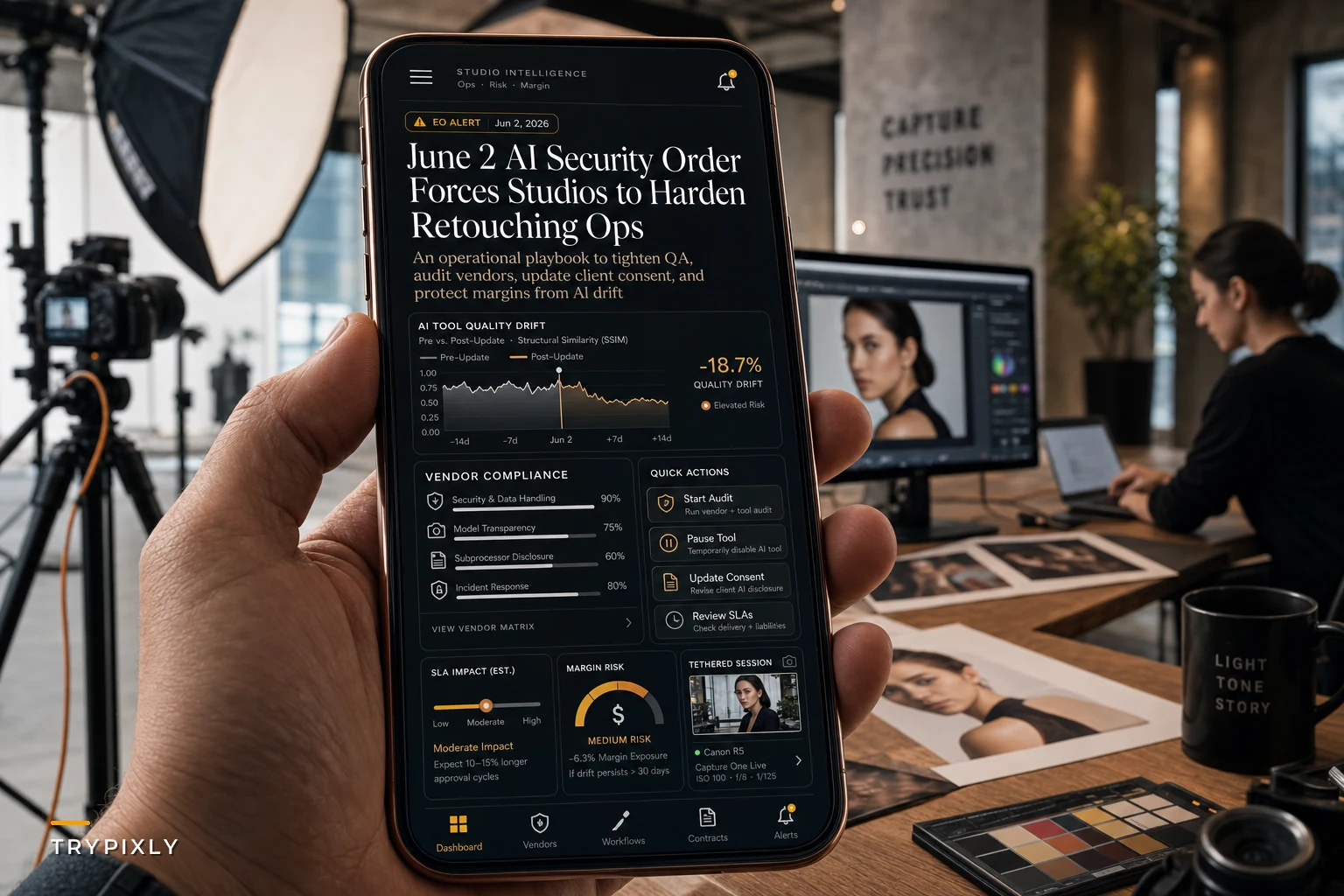

The photography studio owner's group chat exploded Monday morning. The White House had just released their "Promoting Advanced Artificial Intelligence Innovation and Security" executive order, and everyone wanted to know what it meant for their AI retouching tools. Half the messages were panicked questions about whether Luminar would still work next week. The other half were trying to figure out if their client contracts needed emergency updates.
The panic was overblown, but the questions weren't wrong. This AI executive order studio retouching situation creates real operational headaches—especially if you're running AI-powered background removal on 400+ headshots monthly or using third-party retouching farms that rely on machine learning for skin smoothing.
The order establishes a voluntary pre-release review framework for powerful AI models and directs federal agencies to coordinate cybersecurity measures around AI tools. For studios, this translates into three immediate concerns: vendor stability, data security requirements, and client consent complexity.
Why vendor vetting just became your Monday morning problem
Most studio managers discover their vendor's AI practices the hard way—when a retouching service changes their terms mid-contract, or when a background removal tool starts watermarking outputs pending "security review compliance."
The executive order creates a ripple effect through the vendor ecosystem. Your retouching service that processes 200 images weekly might suddenly pause operations to undergo voluntary government review. That AI-powered culling software you rely on for wedding workflows could update their data retention policies overnight. The skin smoothing preset pack running on neural networks might require new authentication protocols that break your existing Lightroom automations.
Here's what that looks like in practice: a studio processing corporate headshots discovers their offshore retouching vendor can no longer guarantee data localization. The vendor's AI models need review under the new framework, so they're restructuring their entire backend. Meanwhile, you have 85 headshots due Friday and no backup workflow.
The vetting process gets brutal when you're evaluating multiple vendors at once. You need to assess:
Technical implementation details
-
Where AI processing happens (local vs. cloud)
-
What models they use and where those models came from
-
How they handle version updates
-
Whether they maintain fallback non-AI workflows
Business continuity factors
-
Their compliance roadmap for the executive order
-
Alternative processing options if AI features get restricted
-
Service level guarantees during transition periods
-
Contract modification rights and notice periods
Data handling specifics
-
Where edited images get stored during processing
-
How long AI training data gets retained
-
Whether your images contribute to model training
-
Cross-border data transfer protocols
Studios running tight margins can't absorb a two-week vendor disruption. Vendor redundancy needs to be built into your operational model before something breaks.
Client consent complexity beyond the standard model release
The traditional model release covers image usage rights. AI-processed images are a different legal territory that standard releases don't touch.
Never miss a shoot or client detail again.
TryPixly helps you book, confirm, and manage every photography session seamlessly.
- Unified session and client management
- Automated client reminders
- Team calendar & resource scheduling
No credit card required
A family portrait studio in Austin ran into this after a client discovered their retouched images in an AI training dataset. The studio's release covered "digital enhancement and manipulation" but said nothing about machine learning applications. The client hadn't consented to their children's faces being used to train future AI models.
According to analysis from the Council on Foreign Relations, the executive order signals increased scrutiny around AI data practices. That means studios need explicit consent language covering:
-
AI-specific processing methods
-
Third-party AI tool usage
-
Data retention for AI operations
-
Potential inclusion in training datasets
-
Cross-border processing for AI enhancement
The consent conversation gets messier with corporate clients who have their own internal AI policies. A tech company booking headshots might prohibit any AI processing of employee images. A financial services firm might require specific security certifications from any AI tools touching their executives' photos. Healthcare organizations often ban cloud-based AI processing entirely.
You can't just add a line to your existing contract. The consent structure needs multiple tiers:
Basic AI processing consent Covers standard retouching—blemish removal, color correction, background cleanup—using AI-assisted tools that process locally without data retention.
Advanced AI enhancement consent Includes skin smoothing, body reshaping, background replacement using cloud-based AI services that may temporarily store images during processing.
Full AI utilization consent Allows use of more advanced AI features including style transfer, age progression/regression, complete facial reconstruction, with the understanding that images may be processed internationally and potentially used for model improvement.
Each tier needs different pricing, turnaround times, and quality guarantees. Your intake forms need to capture which level each client accepts before the session even starts.
The following table summarizes how each consent tier maps to operational and contractual requirements:
| Consent Tier | Processing Type | Data Retention Risk | Pricing Impact | Client Category |
|---|---|---|---|---|
| Basic AI | Local, no cloud | Low | Standard | General public, personal sessions |
| Advanced AI | Cloud-based | Medium | +10–20% | Small business, non-sensitive corporate |
| Full AI utilization | International cloud | Higher | Custom quote | Creative, brand, editorial clients |
Getting clients to understand these distinctions without turning your intake process into a legal deposition is a separate challenge—but it's a lot easier than explaining an AI data breach after the fact.
Quality control when your AI tools behave differently every update
AI retouching tools don't degrade gradually—they change behavior suddenly with each model update. Your perfectly calibrated skin smoothing preset produces completely different results after a Tuesday morning patch. The background removal that cleanly handled hair detail starts leaving halos around every subject.
The executive order's security framework means more frequent model updates as vendors patch vulnerabilities and adjust to new requirements. Each update potentially breaks your quality baseline.
A portrait studio running 300+ sessions monthly discovered this after their AI culling tool updated its selection algorithm. The tool started flagging closed-eye shots as "preferred" because the new model weighted facial symmetry differently. They didn't catch it until delivering galleries where every third image had someone mid-blink.
Quality drift tends to happen in phases:
-
Phase 1
Subtle changes Colors shift slightly warmer. Skin texture gets marginally smoother. Background blur intensity creeps up. Clients don't complain, but something feels off.
-
Phase 2
Workflow disruption Batch processing produces inconsistent results. Some images over-process while others barely change. You start manually reviewing every image instead of trusting presets.
-
Phase 3
Client-visible problems Delivered galleries show obvious inconsistencies. Skin tones vary between shots from the same session. Background removal leaves artifacts. Revision requests spike.
Traditional QA assumes consistent tool behavior. AI tools require something more dynamic—an approach that treats your workflows as living systems rather than fixed procedures.
[GRAPH: AI Tool Quality Drift Detection Workflow — from post-update test batch → parallel comparison → team review → rollback decision or staged rollout]
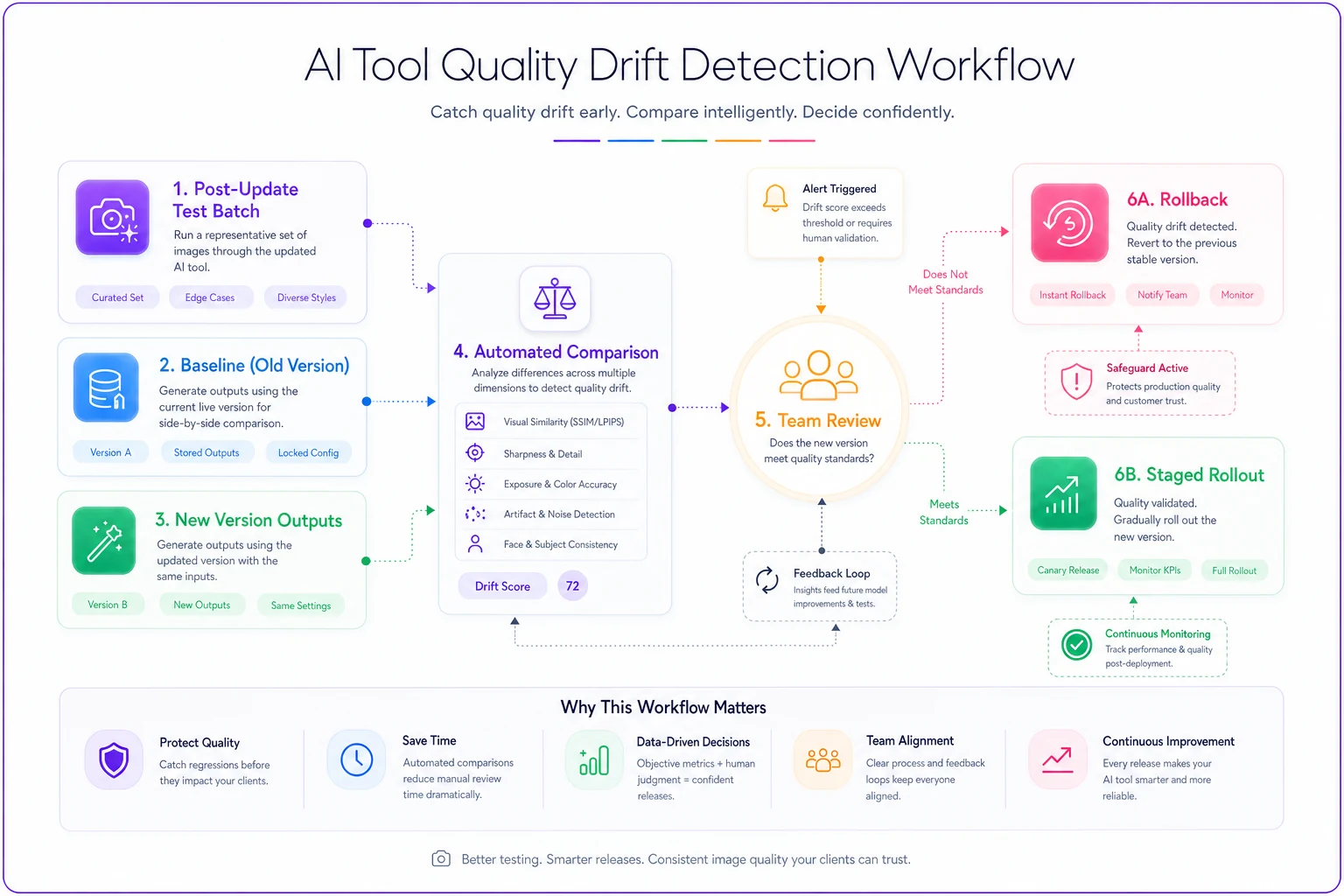
In practice, that means building a few specific habits into your operations:
-
Baseline image sets for testing after each update
-
Parallel processing paths for comparison
-
Staged rollouts for new AI features
-
Client feedback loops tied to specific tool versions
-
Rollback protocols for problematic updates
Keep a labeled baseline set for each common shoot type to speed post-update comparisons and reduce subjective debate.
The overhead compounds fast when you're managing multiple AI tools. Your retouching workflow might include AI-powered culling, background removal, skin enhancement, and color grading—each on independent update cycles, each capable of drifting on its own. Most studios don't realize how many moving parts they're depending on until one of them breaks.
Building operational resilience before the scramble intensifies
Most studios run one primary workflow with minimal redundancy. When that workflow breaks—vendor disruption, consent complications, quality issues—everything stops.
The smarter move is building parallel capabilities before you need them. That doesn't mean doubling your tool costs. It means mapping fallback options at each step of your workflow.
Consider a wedding photography studio processing 50–60 events annually, roughly 75,000 images total. Their standard workflow:
-
AI culling reduces 1,500 shots to 400 selects
-
AI color correction applies base grades
-
AI retouching handles skin and background cleanup
-
Manual review and fine-tuning
-
AI export optimization for web/print
When their culling tool pauses for security review, the pipeline breaks at step one. Studios with operational resilience have already mapped alternatives:
For culling: Manual selection takes roughly 3x longer but maintains control. An alternate AI tool with a different model architecture. A hybrid approach using AI for an initial pass, manual for finals.
For color correction: Preset-based workflows without AI. A different AI grading tool with local processing. Outsourced color correction with a 24-hour turnaround.
For retouching: Traditional Photoshop actions for basic cleanup. A backup retouching service with non-AI options. A simplified editing style that requires less manipulation overall.
The key is testing alternatives during normal operations, not in crisis mode. Run 10% of your work through backup workflows monthly. Track time differences, cost impact, and quality variations. Document exactly which team members know each alternative process.
The vendor contract modifications you need this quarter
Existing vendor agreements probably don't address AI-specific concerns. Most photography service contracts focus on turnaround times, image rights, and basic confidentiality—not what happens when AI models get pulled for security review or when processing locations suddenly matter for compliance.
Start with your highest-risk vendors—anyone processing more than 100 images monthly or handling sensitive client categories like corporate headshots, school portraits, or healthcare.
Request these specific modifications:
Service continuity provisions
-
Maximum disruption periods before penalties apply
-
Mandatory 30-day notice for AI model changes
-
Guaranteed non-AI fallback options
-
Right to immediate contract termination if AI services cease
Security and compliance terms
-
Specific security certifications and audit rights
-
Data localization guarantees
-
Incident notification within 24 hours
-
Compliance with current and future AI regulations
Liability and indemnification updates
-
Clear liability for AI-generated errors or artifacts
-
Indemnification for client claims related to AI processing
-
Insurance requirements covering AI-related risks
-
Dispute resolution specific to AI functionality
Some vendors will push back or claim standard terms are sufficient. The operational risk of unclear AI provisions far exceeds the hassle of renegotiating. A single client dispute over AI processing consent could cost more than your annual software budget.
Training your team when the ground keeps shifting
AI tool training used to be simple—learn the interface, understand the presets, practice the workflow. Now teams need to understand AI limitations, security implications, and consent requirements while adapting to constant tool changes.
The typical failure: spending two days teaching specific tool features that change completely within a month. Your team memorizes menu locations and keyboard shortcuts for things that get redesigned or removed in the next update.
Effective AI tool training focuses on concepts, not specifics:
-
Understanding AI behavior patterns Why skin smoothing sometimes affects hair texture. How background removal decides edge boundaries. When to expect inconsistent results. What tends to trigger quality degradation.
-
Recognizing AI artifacts and errors The signs of over-processing. Common failure modes for each tool. Quick visual checks for AI-generated problems. When to abandon AI processing entirely.
-
Client communication skills Explaining AI benefits without overselling. Setting realistic expectations for AI retouching. Handling concerns about AI image processing. Navigating consent conversations without making clients feel interrogated.
-
Workflow flexibility Switching between AI and manual methods mid-session. Adjusting quality standards based on tool performance. Recognizing when AI helps versus when it's just slowing you down.
Regular calibration sessions matter here. Every couple of weeks, process the same set of test images through your AI workflows. Compare results across team members. Discuss variations and agree on acceptable ranges. It builds shared quality standards even as the tools keep changing.
The stress test your studio needs before July
Running a proper stress test reveals weak points before they become crisis points. Most studios discover their vulnerabilities during peak season when there's no time to fix anything.
Design your stress test around realistic scenarios:
Scenario 1: Primary retouching vendor goes dark Your main retouching service announces a 14-day pause for security review compliance. You have 300 images in their queue and 400 more from this weekend's sessions. Test your ability to redirect work to backup vendors, bring retouching in-house temporarily, or adjust delivery timelines with client communication.
Scenario 2: AI tool produces sudden quality issues After a morning update, your background removal tool starts leaving visible halos around every subject. Test how quickly you can identify the problem, implement workarounds, communicate with affected clients, and prevent future sessions from running through the broken tool.
Scenario 3: Major client rejects AI processing Your biggest corporate client, worth around $4,000 monthly, suddenly prohibits any AI tool usage on their employee headshots. Test whether you can maintain profitability with purely manual workflows, adjust pricing appropriately, or build out AI-free service tiers.
Scenario 4: Consent dispute escalates A client claims they never consented to AI processing and demands either a full refund or complete manual re-editing of their 200-image wedding gallery. Test your documentation systems, dispute resolution process, and ability to show that consent was obtained.
Document everything. Time each workaround. Calculate cost impacts. Note which team members struggled with backup processes. Identify which client communications worked versus which created more confusion.
Practical steps for Monday morning
You don't need to rebuild everything. Start with the highest-impact, lowest-effort adjustments that reduce your exposure immediately.
Week 1: Audit and document
-
List every AI tool in your workflow
-
Identify which vendors use AI, even if it's not advertised
-
Pull current contracts and terms of service
-
Document which clients have AI-sensitive requirements
Week 2: Update critical agreements
-
Revise client contracts with AI consent language
-
Send modification requests to your top three vendors
-
Create tiered service options (AI vs. non-AI)
-
Draft incident communication templates
Week 3: Build redundancies
-
Test backup tools for each AI function
-
Train at least one team member on each alternative workflow
-
Establish quality checkpoints after AI processing
-
Create rollback procedures for problematic updates
Week 4: Implement monitoring
-
Schedule weekly tool behavior checks
-
Set up vendor announcement monitoring
-
Create client feedback tracking for AI issues
-
Establish monthly workflow stress tests
None of this is about abandoning AI tools—they're still genuinely valuable for studio efficiency. But federal focus on AI security means the operational landscape will keep shifting. Studios with flexibility built into their operations can adapt without disrupting client delivery.
Moving beyond reactive scrambling
Studios stuck in reactive mode will spend the next year in constant fire drill mode. Every vendor update, regulation change, or client concern triggers another crisis. Teams burn out from continuous workflow changes. Clients lose confidence in your consistency.
The answer isn't avoiding AI—it's building robust approval and quality control systems that work regardless of which tools you're running. When your QA process catches issues whether they come from human error or AI artifacts, tool changes become manageable adjustments rather than emergencies.
A commercial photography studio in Denver restructured their operations this way after losing a major client over inconsistent AI retouching. They built review checkpoints that work identically for AI-processed and manually edited images. Quality standards focus on output characteristics, not processing methods. Their clients don't care whether background removal used AI or manual masking—they care that it looks professional and consistent.
The AI executive order creates short-term complexity but pushes the industry toward better operational practices overall. Studios that use this moment to build more resilient workflows will come out ahead. Those that just react to each change will keep struggling.
Your immediate priority should be understanding your current vulnerabilities, not panicking about potential regulations. Map your AI dependencies. Identify single points of failure. Build alternatives before you need them. The studios still thriving a year from now won't be the ones who avoided AI or buried their heads—they'll be the ones who built enough operational flexibility to handle whatever comes next.
Your immediate priority should be understanding your current vulnerabilities, not panicking about potential regulations. Map your AI dependencies. Identify single points of failure. Build alternatives before you need them. The studios still thriving a year from now won't be the ones who avoided AI or buried their heads—they'll be the ones who built enough operational flexibility to handle whatever comes next.
Ready to elevate your studio’s workflow?
Join 500+ studios using TryPixly to save time, reduce scheduling conflicts, and deliver exceptional client experiences.