


Every studio that grows past two shooters hits the same wall. You land a run of weddings or a corporate headshot contract, bring in a freelancer to cover the overflow, and spend the next three weekends fixing their files, re-editing color, and apologizing to a client because the culled gallery looked nothing like your house style. The contractor was talented. That was never the problem. The problem was handing them a login and a shoot date and expecting them to absorb five years of studio standards by osmosis.
A proper photography contractor onboarding workflow isn't a welcome email. It's a packet — a fixed set of documents, standards, and two structured checkpoints — that turns a stranger's output into something indistinguishable from yours. Done right, it cuts ramp time from a full season of babysitting down to a couple of weeks and one calibration shoot. This is what goes in it and how the 30/90-day rhythm actually works.
Why ramp time balloons in the first place
The delay almost never comes from skill. It comes from missing reference points. A new contractor makes dozens of small decisions on every job — where to put the subject relative to a window, how much headroom to leave, whether to bracket, how warm to run the white balance. Each of those is a coin flip if you haven't told them what you want. Multiply that across a 400-image wedding and you get a gallery that's maybe 70% usable and 30% "why did they do that."
In practice, this usually shows up as invisible rework. The contractor delivers, an editor or the owner opens the files, and instead of moving straight to production they're re-culling, re-cropping, and correcting exposure drift. That labor rarely gets tracked, so it doesn't feel like a cost. But if a senior editor spends four extra hours cleaning up every job from a new shooter across their first eight jobs, that's close to a full work week of hidden expense buried in payroll — for one hire.
The other driver is inconsistent file handling. A shooter who names files IMG_4471.jpg and dumps everything in one folder forces someone downstream to reconstruct the entire structure. When you've got three contractors each inventing their own system, your ingest step becomes a guessing game and files start going missing between capture and delivery.
What actually goes in the packet
Think of it as three layers: legal, standards, and calibration. Legal protects the business. Standards protect the output. Calibration proves the first two actually landed. Most studios build the legal layer and skip the other two, which is exactly backwards — the contract stops you getting sued, but the standards are what make the hire worth it.
Never miss a shoot or client detail again.
TryPixly helps you book, confirm, and manage every photography session seamlessly.
- Unified session and client management
- Automated client reminders
- Team calendar & resource scheduling
No credit card required
Here's how the pieces break down and what each one is really for:
| Packet component | What it protects | Common failure if skipped |
|---|---|---|
| Independent contractor agreement | Payment terms, IP ownership, classification | Disputes over who owns the images; misclassification risk |
| NDA / confidentiality clause | Client lists, pricing, unreleased galleries | Contractor poaches clients or posts unreleased work |
| Style guide | Visual consistency | Galleries don't match brand; heavy re-editing |
| File-naming + folder convention | Ingest and delivery pipeline | Lost files, duplicate work, delivery delays |
| Delivery spec sheet | Deadlines, formats, cull counts | Late or wrong-format deliverables |
| 30/90-day calibration plan | Ramp speed and quality drift | Slow onboarding, quality creep over time |
The legal documents you probably have a version of already. The three that studios consistently underbuild are the style guide, the file convention, and the calibration plan — so those get the most attention below.
The style guide has to be specific enough to argue with
A style guide that says "warm, natural, timeless" is worthless. Nobody can shoot to an adjective. A useful style guide gives a contractor enough that you could point at a delivered frame and say "this violates page two."
Put real, testable specifications in it:
-
Exposure target how you meter (e.g., protect highlights, expose for skin), acceptable bracket range for high-contrast scenes
-
White balance your standard Kelvin range for indoor vs. outdoor, whether you shoot a gray card at the start of each setup
-
Composition rules headroom, cropping ratios you deliver in, when to shoot vertical vs. horizontal
-
Cull ratio how many keepers per hour of shooting you expect (a contractor delivering 900 raw files from a 3-hour session didn't cull to your standard)
-
Reference gallery 20–30 delivered, edited images that represent the house look, with short captions explaining why each one works
That last item does more than the rest combined. People match to examples far faster than they match to written rules. When quality drift shows up in multi-shooter studios, it's almost always because reference examples were never given or went stale — worth reading more about in the breakdown on why role matrices, substitution protocols and calibration sessions stop quality drift in multi-photographer studios.
File-naming conventions are boring and they save your delivery pipeline
This is the least glamorous document and the one that prevents the most chaos. A convention only works if it's mechanical — no interpretation required.
Something like:
YYYYMMDDClientLastNameSessionTypeSequenceNumber
So 20240615TorresWedding0142.dng. Every shooter, every job. Then a fixed folder structure: /RAW, /Selects, /Edited, /Delivered, with nothing living loose at the top level.
Enforce filename checks during ingest so incorrect names fail fast and editors don't have to guess what's what.
The thing most owners miss: the convention isn't for the contractor, it's for everyone downstream. When the editor, the album designer, and the person handling final delivery all read the same filename and know exactly what they're looking at, handoffs stop generating questions. If you've dealt with revision rounds spiraling out of control, a lot of that traces back to nobody being sure which version of which file is the approved one — the same root problem covered in the piece on cutting revision rounds and protecting margins with a retouching QA and approval loop.
The calibration shoot: your fastest ramp lever
Before a new contractor touches a paying client, you run one short calibration shoot — a controlled, low-stakes session designed purely to surface where their instincts differ from your standards.
It doesn't need to be elaborate. A one-hour mock session — a friend, a staff member, whatever — shot as if it were a real booking, delivered through your full pipeline. The point isn't the images. The point is watching every decision they make and correcting it once, in a setting where a mistake costs nothing.
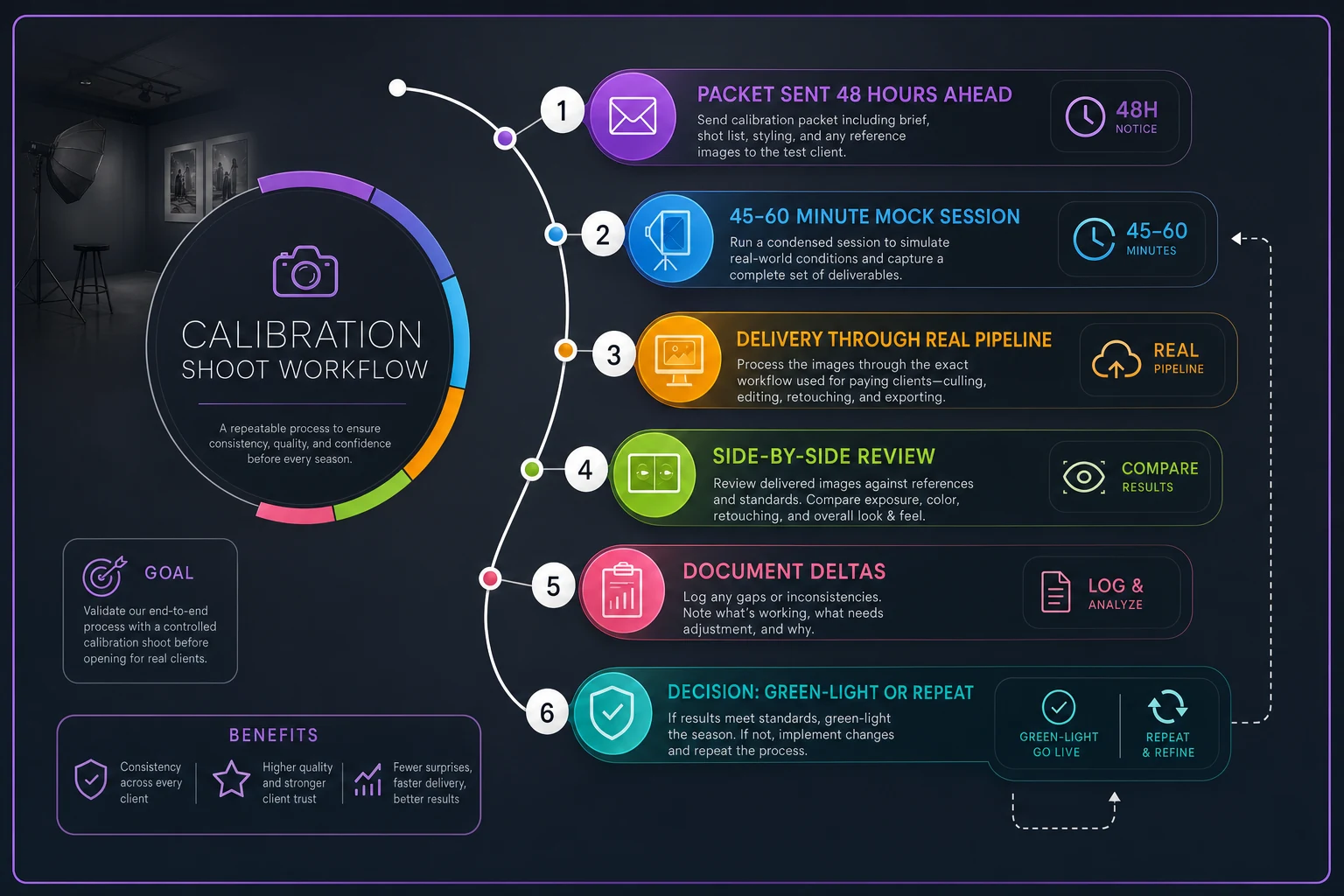
The calibration shoot workflow
-
Send the packet 48 hours ahead. Contract signed, style guide read, file convention acknowledged. The shoot tests whether the documents actually transferred.
-
Run a 45–60 minute mock session covering the session types they'll actually shoot for you — if they're doing headshots and newborns, cover both, because the standards differ sharply between them.
-
Have them deliver through your real pipeline. Correct file names, correct folders, correct format, correct cull ratio, delivered to the same place a real job would land. This tests the boring stuff that usually breaks first.
-
Do a side-by-side review. Open their delivery next to your reference gallery. Walk through five to ten frames out loud — what matches, what drifts, what you'd have shot differently.
-
Document the deltas. Write down the two or three recurring gaps (say, consistently runs 200K too warm, leaves too much headroom, over-delivers on cull). These become their personal checklist for the first live job.
-
Green-light or run a second pass. Most contractors clear on the first calibration. If someone's delivery is way off on fundamentals, one repeat shoot is far cheaper than discovering it on a client's wedding.
Studios that do this consistently get a new shooter to reliable output in about two to three weeks. Studios that skip it usually spend six to ten weeks discovering the same gaps one client complaint at a time.
The 30/90-day calibration plan
The calibration shoot handles day zero. The 30- and 90-day checkpoints handle the drift that creeps in once someone's comfortable — the point where a shooter starts trusting their own habits again instead of your standards.
By day 30: Review the first two to three live jobs against the style guide. This is where you catch small reversions — file naming getting sloppy, cull counts creeping up, a return to their old white balance habit. Quick corrections here, before those habits set.
By day 90: A broader review. Are galleries clearing your QC without rework? Is the editor spending normal time or extra time on their files? Is delivery on schedule? By now you should be able to look at their output and see the house look without effort. If you can't, the packet has a gap that needs fixing — not the contractor.
Two checkpoints instead of one because the day-30 problems are habit reversions and the day-90 problems are consistency and reliability. They're different failure modes and you catch them at different times.
A real scenario
A three-photographer portrait and wedding studio kept losing a full weekend per new hire to re-editing. They'd bring on a contractor for busy season, hand over a shared drive login, and quietly fix everything on the back end for the first couple of months. Their editor estimated four to six extra hours of cleanup per job from any new shooter, stretching across the first eight or so jobs.
They built the packet — legal docs they mostly had, plus a real style guide with a 25-image reference gallery, a locked file convention, and the calibration shoot. The next contractor they onboarded ran the mock session, missed on white balance and cull ratio, got corrected once, and delivered their first live wedding with about an hour of editor cleanup instead of five.
The rough math: cutting four hours of senior editing off each of the first eight jobs saved close to a week of skilled labor on that single hire. Across a season with two or three contractors, the packet paid for the afternoon it took to build many times over — and the client-facing quality stopped being a gamble.
When this is worth it — and when it isn't
Building a full packet takes real effort, so it's fair to ask when it pays off.
It makes sense when you bring on contractors more than once or twice a year, when you run multiple shooters whose work has to look consistent, or when a single bad gallery could cost you a client relationship worth thousands.
It's overkill when you're a true solo operator who subcontracts once a year to a photographer you already know and trust — a shared reference folder and a quick call will do.
Skip the calibration shoot for a proven contractor you've worked with for years and whose output you already know cold. The shoot exists to surface unknowns. There's nothing to surface with someone whose galleries you could pick out of a lineup.
Where a lot of this quietly falls apart
The packet is only as good as its distribution. The most common failure isn't a bad document — it's a good document nobody can find. The style guide lives in someone's email, the file convention is buried in a Slack message from eight months ago, and the calibration notes are on a sticky note. Contractor number four never sees any of it and you're back to babysitting.
Keeping the whole packet in one place — versioned, assigned, acknowledged — matters more than the polish of any single document. Whether that's a shared workspace, a studio management platform, or a structured drive, the rule is the same: one source of truth, with a record that the contractor actually opened it. Studios running this through software that tracks document acknowledgment and ties calibration checkpoints to a contractor's task list don't lose the thread the way manual systems do. But the tooling is secondary. The discipline of building the packet once and keeping it current is what actually shortens ramp time.
Get the packet right and onboarding stops being a season-long project you dread. Sign, read, calibrate, check at 30, check at 90. The next contractor you bring on shouldn't cost you three weekends of cleanup — they should be delivering house-standard galleries before their second live job.
Ready to elevate your studio’s workflow?
Join 500+ studios using TryPixly to save time, reduce scheduling conflicts, and deliver exceptional client experiences.