

Most studios don't have an automation problem. They have a governance problem.
The booking confirmations fire on their own. The gallery-ready emails go out automatically. The reminder texts hit three days before a session. Somewhere along the way, someone wired up a dozen little automations, and now nobody actually knows what happens when a client replies "can we move this to Saturday?" to a system that isn't listening. The message vanishes. The client waits. Two days later you're apologizing.
That's the real risk with studio automation — not that it fails loudly, but that it fails quietly, at 2am, to a client who never gets a human response and quietly books someone else instead. Nobody set a threshold for when a human should have stepped in. Nobody wrote down what happens when the workflow breaks. And there's no log to reconstruct what went wrong. Studio automation governance is the unglamorous layer that decides which tasks are safe to hand off, when a human has to review before something goes out, how you unwind a bad automation, and how you keep a record of every automated decision. Get that layer right and automation becomes a quiet multiplier. Skip it and you're just scaling your mistakes faster.
Why the "automate everything" instinct backfires at scale
When a studio is small — one or two shooters, maybe 15–20 sessions a month — automation feels harmless because you're watching everything anyway. You see the confirmation go out because you set the appointment. If something's off, you catch it in the same inbox you're in all day.
The trouble starts when volume grows and visibility drops. A studio doing 40–60 sessions a month across multiple photographers has too many moving parts for one person to eyeball. So automations stack up. And the pattern that keeps appearing: each one is added in isolation, to solve one annoyance, without anyone asking how it interacts with the other twelve.
A typical example: you add an automatic "your gallery is ready" email tied to when files hit the delivery folder. Fine. Then separately, someone sets up a rule that moves projects to "complete" once the gallery link generates. That triggers the automated review-request sequence. So a client whose retoucher accidentally uploaded a half-finished gallery gets a "we'd love your feedback!" email before they've even seen the final images. Every individual automation worked. The system embarrassed you.
The core issue is that automation multiplies both good decisions and bad ones. If your underlying process has gaps — and most studios have plenty — automation doesn't fix them. It accelerates them into the client's inbox faster than you can catch.
The decision matrix: what to automate, what to gate, what to leave alone
Before you automate anything, run it through two questions: How reversible is this if it's wrong? How much does a mistake cost? Those two axes decide almost everything.
Never miss a shoot or client detail again.
TryPixly helps you book, confirm, and manage every photography session seamlessly.
- Unified session and client management
- Automated client reminders
- Team calendar & resource scheduling
No credit card required
| Task type | Reversibility | Cost of a mistake | Recommendation |
|---|---|---|---|
| Appointment reminder texts | High | Low | Full automation |
| "Gallery ready" notification | Medium | Medium | Automate with a status gate (files QC-passed) |
| Rescheduling within policy | High | Low–Medium | Automate with confirmation step |
| Deposit / cancellation charges | Low | High | Human review required |
| Final invoice / balance due | Low | High | Human review required |
| Contract or model release delivery | Low | High | Human review required |
| Lead reply / first inquiry response | Medium | Medium | Automate the acknowledgment, gate the quote |
| Review-request sequence | Medium | Medium | Automate, but gate on project truly complete |
| Vendor / retoucher handoff | Medium | Medium–High | Automate the transfer, gate the approval |
What people miss: the same category of message can land in two different cells depending on the trigger. An auto-reply that says "got your message, we'll respond within a few hours" is safe. An auto-reply that quotes a price based on a keyword the client used is not — because clients describe their needs badly, and your automation will confidently misprice a wedding as a headshot session.
Keep the acknowledgment automated. Gate anything that commits you to a number, a date, or a legal obligation.
Setting thresholds for human review
A threshold is just the line where the system stops and says "a human should look at this." The mistake studios make is setting no thresholds at all, or setting them so tight that a human has to approve every single message — which defeats the point.
Good thresholds are tied to specific, observable conditions. Not gut feeling. Here are the ones worth wiring in:
-
Value threshold — any booking, invoice, or refund above a dollar amount (say $1,500 for a lot of studios) routes to a person before it goes out.
-
Confidence threshold — if an automated classification is unsure (a message that could be a new lead or an existing client, an image batch that failed a QC check), it stops and flags.
-
Off-policy threshold — a reschedule request inside your cancellation window, a discount request, a rush-delivery ask. Anything that would break a standard rule needs eyes.
-
First-contact threshold — brand-new clients get more human attention than repeat clients, because you have no history to lean on and the relationship is still fragile.
-
Volume-spike threshold — if the same automation fires an unusual number of times in a short window (a sync loop, a duplicate trigger), it pauses and alerts. This one catches runaway automations before they email 200 people twice.
In practice, the confidence threshold is the one that pays for itself most consistently. A studio doing volume school and sports work will have batches that partially fail export. Without a threshold, the "delivery ready" note fires anyway and parents get broken links. With a threshold — "if fewer than 100% of expected files are present, hold and flag" — a coordinator gets a nudge instead, and the client never sees the mess.
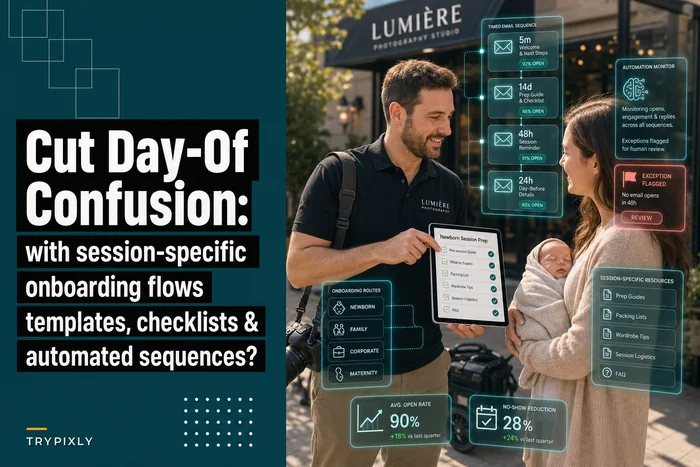
The onboarding stage is where thresholds earn their keep, because that's where a wrong automated message does the most damage to a new relationship. If you're building session-specific flows, it's worth reading how session-specific onboarding flows reduce day-of confusion — the same logic applies: match the automation to the exact context, and gate anything that varies by session type.
Rollback procedures: what to do when automation gets it wrong
Every automation needs an answer to one question before it goes live: if this fires wrong, how do we take it back? Studios almost never plan this out, then panic when a bad batch of 80 "your prints have shipped" emails goes out to people whose orders are still sitting on the bench.
A rollback procedure has four moving parts.
-
Detection. How do you find out it went wrong? Ideally a volume-spike or confidence threshold catches it. Realistically, sometimes a client tells you. Either way, you need a fast path to "something's off."
-
Containment. Immediately pause the automation so it stops making the problem bigger. If you can't pause a single automation without shutting down your whole workflow, that's a design flaw worth fixing before you scale further.
-
Correction. Figure out who's affected and send a correcting message. A short, honest, human note beats silence every time. "That shipping notice went out early — your order is still in production and will ship Thursday. Sorry for the confusion."
-
Root-cause fix. Find the trigger that misfired and repair it before you turn the automation back on. Turning it back on without doing this just resets the clock on the next incident.
Here's the process for when an automation misfires on a client-facing message:
-
Confirm the scope — how many clients, which message, what was wrong.
-
Pause the specific automation (not the whole system).
-
Pull the list of affected clients from the log.
-
Draft one honest correction and send it from a human-looking sender.
-
Note the incident somewhere durable — what fired, why, who was touched.
-
Fix the trigger condition or add a threshold that would've caught it.
-
Re-enable only after a test run on a dummy record.
Visualize the rollback steps as a simple flow to make sure everyone on the team knows their role.
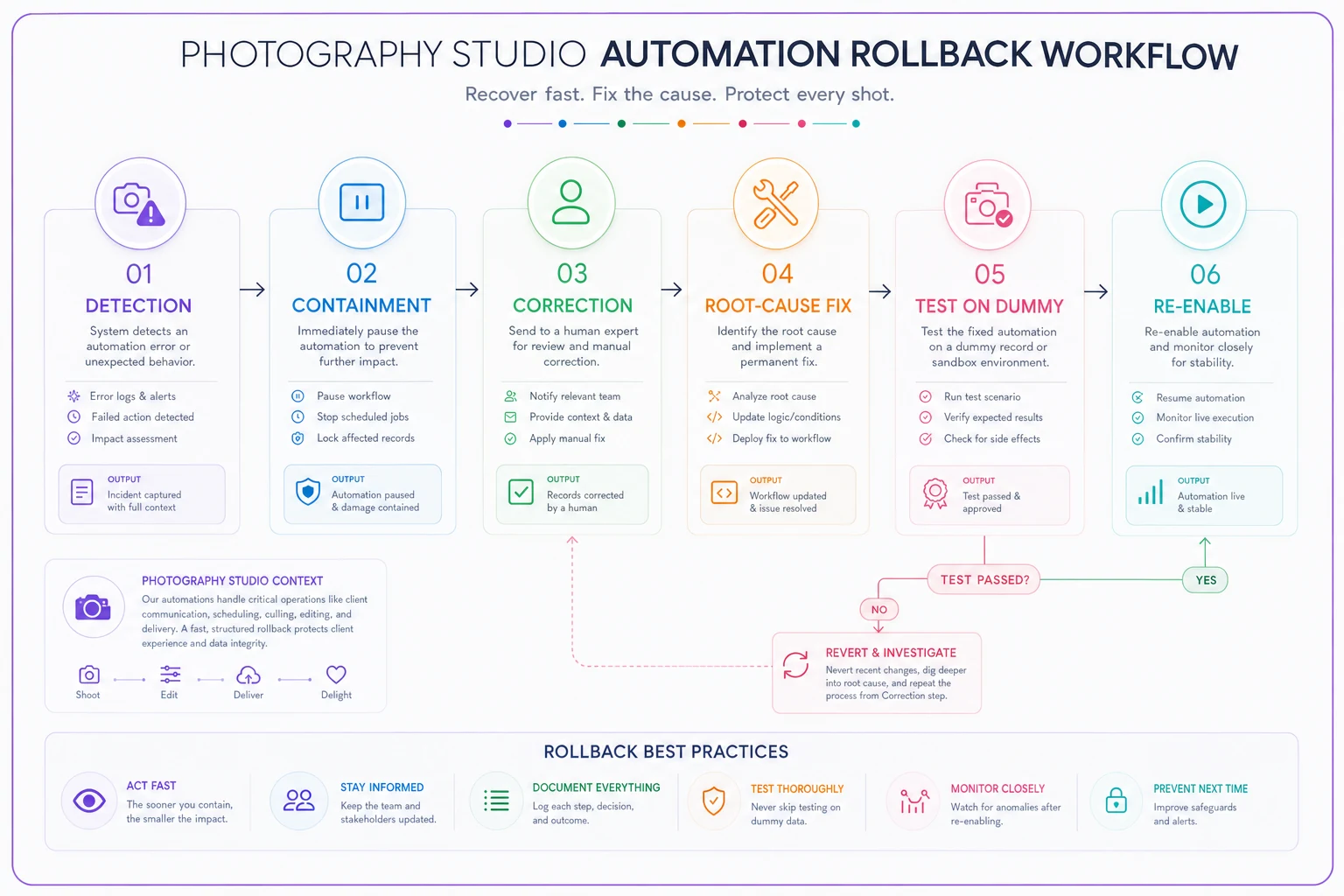
That last step is the one people skip and regret. Never re-enable a fixed automation straight into live client data. Fire it once at a test record and watch what happens.
Monitoring and audit logs: the part nobody wants to build
An automated studio without logs is flying blind. When a client says "I never got my gallery link," you need to answer — did the system send it, when, and to what address — in seconds, not by digging through three separate tools.
-
What automation fired
-
When it fired
-
What triggered it (which status change, which client action)
-
What it did (message sent, charge made, status changed)
-
Whether it hit a threshold and required review
-
Who approved it, if a human was in the loop
This sounds like overkill until the first time a client disputes a charge or a photographer swears they delivered on time. The log turns "he said, she said" into a timestamp. It also turns your automations from a black box into something you can actually tune — because now you can see which automations misfire, which thresholds trip too often, and which ones never trip at all (usually a sign the threshold is set uselessly high).
Monitoring is the live version of this. Once a week, someone should look at: how many automations fired, how many got held for review, how many reviews are still sitting unactioned. That last number is the sneaky one. Held-for-review items pile up when nobody owns the review queue, and a threshold that stops a message but never gets cleared is just a slower way to ghost a client.
Check the held-for-review queue daily to prevent backlog and customer-impacting delays.
This connects directly to your service commitments. If you've defined response and delivery windows, your monitoring should tie back to them — the same discipline covered in an operations playbook for closing SLA gaps from inquiry to delivery. An automation that quietly holds a message for review is fine, until it blows a response window nobody was watching.
Sample guardrails for booking, messaging, and delivery
Guardrails are the concrete rules that make all of the above real. Here's a starting set across the three processes where studios automate most.
Booking guardrails
-
Auto-confirm sessions inside standard policy; route anything requiring a deposit override, venue deposit, or a date inside the cancellation window to a human.
-
Never let an automation double-book a photographer or gear item — the availability check runs before the confirmation sends, not after.
-
Any booking above your value threshold gets a human glance before the confirmation goes out.
Messaging guardrails
-
Automated replies acknowledge and set expectations; they never quote prices or commit to dates.
-
First-contact leads get a human touch within the response window, even if an auto-acknowledgment went out first.
-
No automation sends more than one message to the same client within a set window without a human check — this stops the "four emails in an hour" nightmare when triggers overlap.
Delivery guardrails
-
"Gallery ready" and "order shipped" only fire on a verified status, not a proxy for it (file present ≠ file correct).
-
Any delivery message tied to a batch holds if the batch is incomplete.
-
Licensing files and final high-res deliverables require human release, always — these are irreversible and high-cost by definition.
The through-line across all three: automate the acknowledgment and the routine, gate the commitment and the irreversible. That single principle covers most of what a studio actually needs.
A real scenario
A three-photographer portrait and headshot studio, somewhere around 45–55 sessions a month, had wired up automations piecemeal over a couple of years. Confirmations, reminders, gallery notices, review requests — all firing on their own, none of them logged, none of them gated.
The breaking point came when two things collided. A retoucher uploaded a partial gallery, which tripped the "complete" status, which fired both the delivery email and the review-request sequence to a client who'd paid for a premium package. The client saw an unfinished gallery and a request to leave a five-star review in the same afternoon. That one cost them the reorder and a referral they'd been counting on.
They didn't add more automation to fix it. They added governance. Delivery messages got gated on a verified-complete status instead of a proxy. A value threshold routed premium bookings and invoices over $1,500 to a human. They set up a simple log so every automated message left a timestamp. And they assigned one person to clear the review queue twice a day.
The change wasn't dramatic on paper — they were still automating roughly the same volume of routine work. But the misfires that used to reach clients basically stopped, held-for-review items got cleared same-day, and "I never got my email" disputes dropped to almost nothing because the log answered them instantly. The studio didn't automate less. It automated with brakes.
When heavy automation makes sense — and when it doesn't
When it makes sense: you're past the volume where one person can watch everything, your underlying processes are already documented and stable, and you're willing to build the logging and review discipline alongside the automations. Automation on top of a solid process is leverage.
When it's a bad idea: your processes are still messy and undefined. Automating a broken workflow just breaks it faster and at greater scale. Fix the process on paper first, then automate the stable version of it.
Who should hold off entirely: a brand-new studio still figuring out its session types, pricing, and delivery flow. At that stage the process is changing constantly, and every change means rebuilding automations. Do it by hand until the workflow stops moving, then automate the parts that have gone quiet and predictable.
The studios that win with automation aren't the ones with the most automations. They're the ones who can tell you, in one sentence, what every automation does, when a human steps in, and what happens when it breaks. That's studio automation governance — not the flashy part, but the part that decides whether automation quietly makes you money or quietly loses you clients while you sleep.
Ready to elevate your studio’s workflow?
Join 500+ studios using TryPixly to save time, reduce scheduling conflicts, and deliver exceptional client experiences.