


Most studios don't have an editing quality problem. They have an editing coordination problem. The images come back fine — eventually. The issue is nobody can tell you where a specific wedding sits in the pipeline right now, why one editor is buried while another is idle, or why the "3-day turnaround" the sales team promised has quietly become nine.
When editing lives with one person, this is invisible. You just know the work gets done. The moment you split editing across two, three, or five people — some in-house, some contract, maybe an offshore studio for volume culling — the whole thing turns into a game of telephone with RAW files. And the failure modes are almost always the same regardless of studio size.
This is a systems article, not a tips list. The goal is to show how a distributed photo editing operation actually holds together (or falls apart) — the handoffs, file conventions, batch rules, SLAs, QA gates, and the fallback processes that keep everything from stalling when one link breaks.
Why distributed editing breaks in predictable ways
Editing pipelines don't fail randomly. They fail at the seams — the exact points where a job moves from one person to another.
A single editor keeps everything in their head. They know the client's style preferences, they remember the outdoor set was shot in mixed light, they know which frames the couple hated. None of that is written down because it never needed to be. The knowledge and the work lived in the same brain.
Distribute that work and you've separated the knowledge from the labor. Now the person culling isn't the person color-grading, who isn't the person doing skin retouching, who isn't the person handling final export. Every one of those transitions is a place where context gets dropped.
What tends to happen is that the bottleneck is rarely the actual editing time. It's the waiting — files sitting in a shared drive because nobody knows they're ready, revisions bouncing back because the brief was vague, an offshore batch that came back at 2am that nobody checks until noon. The dead time between steps often dwarfs the working time. And owners consistently underestimate this: it gets worse non-linearly as you grow. Two editors is manageable with a Slack channel. Five editors across two time zones and three skill levels, running 20+ weddings a month alongside corporate headshots and school volume work? That's when "just message each other" falls apart completely.
The four seams where jobs actually stall
Before designing anything, it helps to name the specific points where distributed editing loses time. In real operations, delay concentrates in four places:
Never miss a shoot or client detail again.
TryPixly helps you book, confirm, and manage every photography session seamlessly.
- Unified session and client management
- Automated client reminders
- Team calendar & resource scheduling
No credit card required
-
Intake to assignment — RAWs are ingested but sit unassigned because no rule says who takes what
-
Assignment to first pass — the editor has the files but not the brief, style reference, or client notes
-
First pass to QA — work is "done" but nobody's checking it, or it fails QA and silently loops back
-
QA to delivery — approved work waits on export, upload, or a manual notification step
None of these are about editing skill. They're about information not moving as fast as files move. A file can be copied in seconds. The context around it — "client wants warm tones, avoid heavy skin smoothing, deliver the ceremony first" — moves at the speed of whoever remembers to write it down.
File conventions: the boring thing that saves the most time
Nobody wants to read about naming conventions. But inconsistent file structure is the single largest source of silent delay in a distributed setup, and it's completely preventable.
When editors invent their own folder names, versions get lost. Someone edits an old export. A freelancer delivers into the wrong client folder. QA reviews the wrong batch. Each of these costs 20–40 minutes to untangle, and it happens constantly.
Automate folder and filename creation at ingest so everyone gets the same enforced structure without manual copying.
A workable convention needs three things: it has to encode the job, the stage, and the version — and it has to be enforceable, not aspirational.
A structure that holds up under volume looks roughly like this:
``
[JobID][ClientLastName][SessionType]/
    01RAW/
    02CULLED/
    03FIRSTPASS/
    04QAREVIEW/
    05APPROVED/
    06DELIVERED/
`
And filenames that carry version and editor initials:
`
2024-1187ReyesWeddingv2JM.jpg
``
The point isn't this exact format. The point is that any person — in-house or offshore — should be able to open a job and know instantly what stage it's in and which version is current, without asking anyone. When your file convention answers "where is this and what's the latest?" without a conversation, you've eliminated a huge chunk of your coordination overhead.
Batch rules: stop editing one wedding at a time
Studios that treat every job as a single unit lose efficiency badly. Distributed editing works best when work is grouped by type of task, not by client.
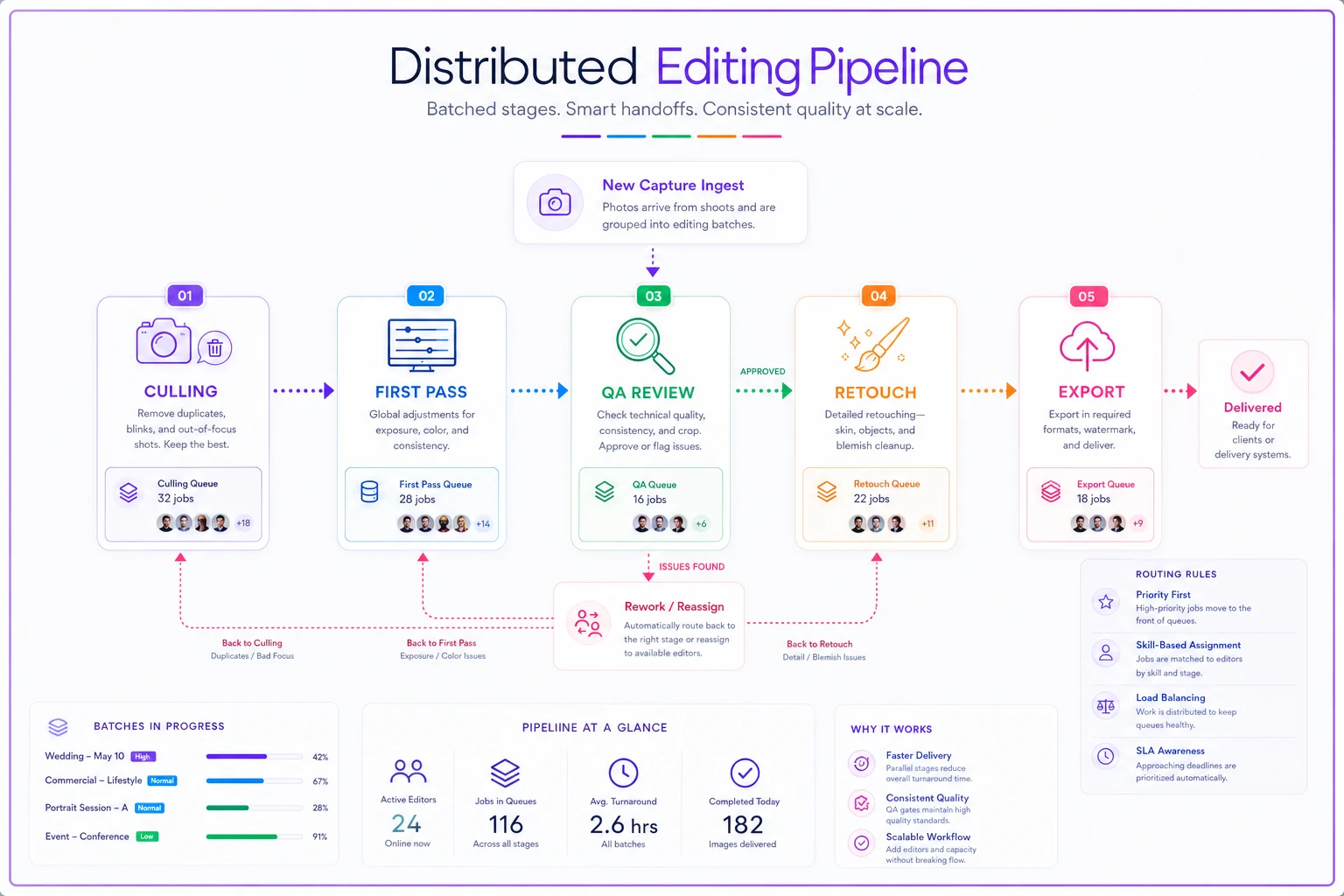
Instead of one editor taking a wedding from cull to final delivery, you split it. One person (or an offshore team) handles culling across five weddings at once. A color-grader batches the grading for all of them using consistent presets. Skin and detail retouching gets pulled out separately for only the frames that need it. Export and delivery is its own batched step.
This matters because switching between task types is where editors lose focus and speed. Culling and retouching use completely different mental modes. Batching by task keeps people in one mode longer, and it makes each step measurable — you can actually track "culling throughput" as a number when culling is its own stage.
Here's a simple visual of the batched stages and handoffs.
-
Batch size — e.g., no first-pass batch larger than 800 images, so QA has manageable review chunks
-
Batch triggers — a batch releases downstream only when the entire batch clears its stage, or on a fixed schedule (e.g., all culls due by end of day for next-morning grading)
-
Priority overrides — rush jobs jump the queue but must be flagged at intake, not mid-pipeline
That last one is where studios lose control. When "rush" gets declared verbally, halfway through a job, it blows up everyone's queue and nobody can plan. Rush status has to be a property of the job set at intake, with a real surcharge behind it, or it just becomes the default.
SLAs and QA gates that actually mean something
An SLA that just says "3-5 business days" is decoration. In a distributed pipeline, you need an SLA per stage, because a single end-to-end number gives you no visibility into where you're slipping.
Here's the difference between a vague SLA and an operational one:
| Stage | Vague version | Operational version |
|---|---|---|
| Culling | "quick turnaround" | 24h from ingest, max 15% of frames flagged for client input |
| First pass | "a few days" | 48h from assignment, presets applied per client style profile |
| QA review | "we check everything" | 12h from first-pass complete, sampled at 100% for weddings, 20% for volume |
| Revisions | "as needed" | 24h per round, capped at 2 rounds before escalation |
| Delivery | "within a week" | 12h from final approval, automated client notification |
When each stage owns a number, a missed deadline points to a specific broken step instead of a general "we're behind." You can't fix "editing is slow." You can fix "culling ran 40 hours instead of 24 three weeks running because the offshore team's shift change dropped Friday intakes."
On the QA side, gates should be explicit stops, not judgment calls. A batch either passes a gate or it doesn't, and if it doesn't, there's a defined path — not a silent bounce back into a shared folder where it sits. If you're building out your QC layer, the three-gate approach covered in preventing outsourced retouching disasters pairs directly with this — the gates are where distributed work either holds quality or drifts.
The other quiet killer is uncapped revision loops. They destroy margins and throughput simultaneously, because every extra round re-enters the pipeline and competes with fresh work. Setting a hard cap and a clean approval process — like the one covered in cutting revision rounds to protect margins — keeps rework from silently consuming your editors' available hours.
Throughput KPIs: what to actually watch
Most studios measure the wrong thing. They track total turnaround time, which is a lagging indicator — by the time it looks bad, the damage is already done. Leading indicators tell you a slowdown is building before clients feel it.
-
Stage cycle time — average hours a batch spends in each stage. This is where you spot the bottleneck.
-
Queue depth per stage — how many jobs are waiting to enter each step. Rising queue depth means a slowdown is building.
-
First-pass QA fail rate — a high fail rate means the brief is bad or the editor is mismatched to the work.
-
Rework ratio — revision hours as a percentage of total editing hours. Above roughly 15% and something upstream is broken.
-
Editor utilization spread — are hours evenly distributed, or is one person at 90% while another sits at 40%?
That last one exposes something owners rarely catch: uneven load isn't usually a staffing shortage, it's an assignment-logic failure. If one editor is drowning and another is idle, you don't need to hire — you need better routing.
One pattern worth watching specifically: when queue depth climbs at one stage while cycle time stays flat, you have a capacity problem at that step. When cycle time climbs but queue depth is flat, you have a quality or clarity problem — work is entering fine but taking longer, usually because briefs are vague or the work type has shifted.
Fallback processes: what happens when a link breaks
Every distributed pipeline eventually loses a link. A freelancer goes dark mid-wedding. The offshore vendor has a holiday you forgot about. An editor gets sick during peak season. Studios without fallback plans treat each of these as an emergency. Studios with them treat it as a Tuesday.
-
Reassignment rules — if an editor misses an SLA by a set number of hours, the job auto-flags for reassignment. No waiting for someone to notice.
-
Cross-training minimums — at least two people capable of handling each stage, so no single step has one point of failure.
-
Style profile documentation — client style preferences stored with the job, not in an editor's memory, so a substitute can pick up cleanly.
-
Vendor redundancy — a backup culling or editing vendor kept warm with occasional small jobs, not discovered in a panic when your primary goes offline.
-
Grace buffer built into client SLAs — if you can deliver in 5 days, promise 7. The buffer absorbs the inevitable broken link without breaking a client promise.
The style profile point deserves emphasis. The reason substitution is so painful in most studios is that "how this client likes their edits" lives in one editor's head. Write it down — reference images, preset settings, do's and don'ts — and any qualified editor can step in. That single document turns a crisis into a handoff.
A worked example
Consider a mid-sized studio running around 18–22 weddings a month plus corporate headshots and some school volume work. Editing is split between two in-house editors and an offshore culling and first-pass vendor.
Before: No stage SLAs, files scattered across editors' own folder systems, revisions uncapped, and everything tracked in a shared spreadsheet updated whenever someone remembered. Average wedding turnaround was running 5–6 weeks in peak season. Roughly a third of that time was jobs waiting between stages, not being actively worked. Two or three clients a month were emailing to ask where their gallery was.
What changed: One file convention enforced across everyone, editing split into batched stages (cull → grade → retouch → export), a 24/48/12-hour SLA on each stage, revisions capped at two rounds, and auto-flagging when a stage ran over. Nothing about the editing quality changed — same people, same skills.
After: Turnaround dropped into the 3–3.5 week range even during busy stretches. The bigger win was predictability — the owner could look at queue depth on a Monday and know whether the week was going to be tight, instead of finding out from an angry client on Friday. "Where's my gallery" emails dropped to almost none. The offshore vendor's late-night deliveries stopped getting lost because the file convention made stage status obvious the next morning. The gains didn't come from working faster. They came from work stopping less often between people.
When a distributed pipeline is worth building
This level of structure isn't free — it takes setup time and real discipline to maintain. It makes sense when:
-
You're running multiple editors or vendors and can't see job status at a glance
-
Turnaround is unpredictable, not just slow
-
You're spending real time answering "where is this job" internally or externally
-
Revision loops are eating margin and you can't quantify how much
When it's overkill: Solo shooter-editors or two-person shops doing under roughly 8 sessions a month don't need this machinery. Your coordination cost is low enough that a shared checklist beats a full pipeline. Building heavy process before you have the volume just slows you down.
Who should hold off: Studios with unstable client-style definitions. If you can't articulate what "your look" is well enough to document it, distributing the work will just distribute the inconsistency faster. Nail down your style standards first, then distribute.
Where software fits — and where it doesn't
You can run all of this in spreadsheets and shared drives, and plenty of studios do at first. It works until the number of active jobs times the number of stages times the number of editors gets large enough that no one person can hold the state in their head. That's usually when things start slipping through.
This is where an operational platform earns its place — not to replace judgment, but to hold the state your team can no longer track manually. The useful pieces are the unglamorous ones: enforcing the file and stage convention, flagging jobs that blow past a stage SLA, surfacing queue depth per stage so bottlenecks show up before clients feel them, routing assignments so load stays balanced. AI-assisted tracking and routing help most exactly here — keeping the pipeline's current state visible without someone manually chasing every handoff.
The mistake is buying a tool first and hoping it imposes process. It won't. Design the conventions, SLAs, and gates on paper, prove they work with your team, then let software carry the coordination load so it doesn't sit on one person's memory.
The real takeaway
Distributed photo editing operations don't get predictable because you hire better editors or find a better vendor. They get predictable when the movement of work between people becomes as reliable as the editing itself. Files move instantly; context and status usually don't — and closing that gap is the entire game.
Fix the seams, name your stages, put a real number on each one, and build the fallback for when a link inevitably breaks. Do that and your turnaround stops being a hope and starts being something you can actually plan around.
Distributed photo editing operations don't get predictable because you hire better editors or find a better vendor. They get predictable when the movement of work between people becomes as reliable as the editing itself. Files move instantly; context and status usually don't — and closing that gap is the entire game.
Ready to elevate your studio’s workflow?
Join 500+ studios using TryPixly to save time, reduce scheduling conflicts, and deliver exceptional client experiences.