



The photography itself is usually the easy part. Studios that book commercial, e-commerce, and editorial work already know how to light a product, pose a model, and hit a look. Where they bleed money and reputation is in everything wrapping the shoot — the vague pre-pro timeline, the shot list nobody signed off on, the usage terms decided over text, the delivery that dribbles out in pieces, and the rights that never got documented properly.
A commercial photography operations blueprint isn't about better cameras or a fancier studio. It's about making the connective tissue between "we booked it" and "we got paid and cleared the rights" reliable enough that scaling doesn't multiply your chaos. This piece walks through how those pieces fit together — and where they crack under volume.
The three workflows aren't the same business
Studios running commercial, e-commerce, and editorial under one roof often treat them like variations of the same job. They're not. They fail differently, and if your operations pretend they're identical, you'll build a system that's wrong for at least two of them.
| Workflow | Volume profile | Biggest risk | Where money leaks |
|---|---|---|---|
| Commercial (brand/ad) | Low volume, high value per asset | Usage scope creep | Underpriced licensing, unbilled reshoots |
| E-commerce (catalog/PDP) | High volume, low value per asset | Throughput bottlenecks | Retouching backlog, inconsistent specs |
| Editorial (magazine/content) | Medium volume, tight deadlines | Rights confusion, credit disputes | Kill fees, unlicensed reuse |
The pattern worth noticing: commercial work punishes you for undercharging rights, e-commerce punishes you for slow throughput, and editorial punishes you for sloppy documentation. A single operations template can't guard all three. What you need is a shared backbone — timelines, sign-offs, delivery gates — with different rules plugged into each lane.
That distinction matters most when you grow. A studio doing four commercial jobs a month can run on memory and goodwill. The same studio doing four commercial jobs plus 900 e-commerce SKUs a month cannot. The e-commerce volume will quietly eat the attention your high-value commercial clients assumed they were paying for.
Pre-production timelines: the part everyone shortcuts
Most production surprises are actually pre-production failures that showed up late. The timeline gets treated as a rough guess instead of a coordination document, and every dependency that wasn't nailed down becomes a fire on shoot day.
Never miss a shoot or client detail again.
TryPixly helps you book, confirm, and manage every photography session seamlessly.
- Unified session and client management
- Automated client reminders
- Team calendar & resource scheduling
No credit card required
A real pre-pro timeline works backward from the delivery date, not forward from the booking. The delivery milestone gets fixed first, then retouching turnaround, then shoot day, then everything that has to be locked before the shoot: talent, wardrobe, props, location permits, product samples arriving, creative approval on the shot list.
-
1. Lock final delivery date with the client — contractual, not aspirational.
-
2. Subtract retouching and revision buffer — for commercial, budget more than you think. Two revision rounds is realistic even with a tight brief.
-
3. Set the shoot date so post has breathing room.
-
4. Set the "everything locked" checkpoint 3–5 business days before the shoot — shot list approved, samples in hand, talent confirmed.
-
5. Set the sample/product arrival deadline earlier than feels necessary. Late samples are the single most common reason e-commerce shoots slip.
-
6. Set the creative sign-off deadline on the shot list and moodboard.
The insight most studios miss: the "everything locked" checkpoint is what actually protects you. If a client blows past it, that's your signal to renegotiate the delivery date before the shoot — not to quietly eat the delay and blow your post-production schedule for the next two or three clients. A slipped sample delivery on one e-commerce job cascades into missed deadlines on the jobs booked behind it, because retouching is a shared resource.
Treat the "everything locked" checkpoint as a contractual milestone so you can renegotiate dates when clients miss it.
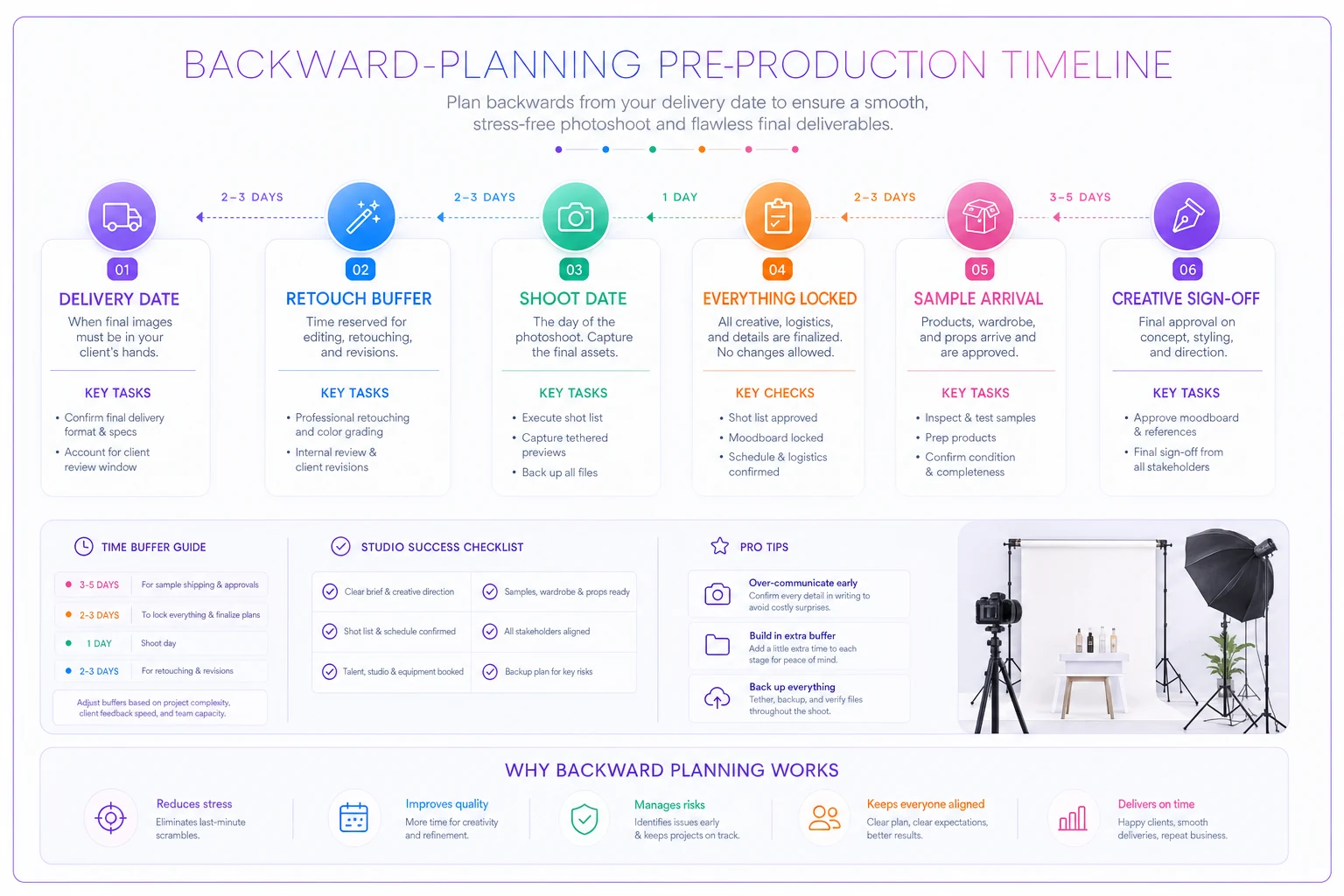
The timeline flags late samples early enough to renegotiate instead of just absorbing them, protecting your post schedule and the jobs booked behind it.
Shot lists as contracts, not suggestions
A shot list should do double duty: it's a production tool and a scope boundary. When it's only treated as a production tool, "can we just grab a few extra angles" turns into forty unbilled shots and a retouching load nobody planned for.
-
Every shot has an ID, a description, and a usage tag — which channel or asset it's destined for.
-
The list is approved in writing before the shoot, with a version number.
-
Anything added on shoot day gets logged as a change order, even if you decide not to charge for it — because that log tells you your true cost later.
-
E-commerce lists tie each shot to a SKU and a spec (background, angle set, cropping standard) so retouching isn't guessing.
For e-commerce especially, the shot list is your throughput map. If you're shooting 300 products with a standard 5-angle set, that's 1,500 raw selects flowing into post. A studio that hasn't tied each of those to a spec sheet will burn hours in retouching just figuring out what each image was supposed to be. The shot list is where you prevent that — not the editing bay.
One mistake that shows up repeatedly: treating editorial shot lists as loose creative exploration with no boundary at all. Editorial is looser by nature, but "loose" still needs a documented intent, because when a shot gets pulled for a purpose nobody licensed, the vague shot list is exactly where the rights fight starts.
Usage pricing decision rules
This is where commercial studios most often leave real money behind. A flat day rate quietly hands the client unlimited usage, and the studio never captures the value of the license — which, for brand work, is often worth more than the shoot itself.
-
Base creative fee covers production and the studio's time.
-
Usage is priced separately, driven by a small set of variables
media channels, geographic scope, duration, and exclusivity.
-
Each variable has a multiplier or tier, so a junior person can quote consistently without you in the room.
A typical example: web-only, one year, non-exclusive sits at your base usage tier. Add paid social and it steps up. Add national out-of-home or exclusivity and it steps up again — sometimes significantly. The point isn't the exact numbers; it's that the rules exist and get applied every time, so pricing doesn't depend on who happened to answer the email.
Two failure modes to watch:
-
The perpetual/unlimited request. Clients ask for it casually because it sounds simpler. Price it like the buyout it is, or scope it tightly. "Unlimited" given away for free is the most expensive checkbox in the industry.
-
Silent scope creep after delivery. Web-only images end up on a billboard six months later. If your shot list and license doc weren't specific, you have no leg to stand on. If they were, that's a legitimate new invoice.
For studios doing high-volume corporate and brand work, usage pricing sits right at the intersection of margin and negotiation — a lot of the same discipline applies that we covered in the B2B ops playbook for corporate and high-volume clients. Enterprise buyers will absolutely test whether your pricing rules hold up, so they need to be written down before the call.
When usage-based pricing makes sense — and when it doesn't
It makes sense when the images carry real commercial weight: brand campaigns, product hero shots, anything tied to paid media. The client is buying leverage, and you should be paid for it.
Forcing usage tiers onto pure-volume e-commerce catalog work is a different story. Nobody's licensing a plain white-background PDP shot for a billboard. There you're selling throughput and consistency, not licensing leverage — so a per-image or per-batch model is cleaner, and bolting usage math onto it just slows down quoting and irritates the client.
Staged delivery milestones
Delivering everything in one final drop feels clean but creates two problems: the client has no early visibility, and you have no early warning if the creative direction was off. By the time they see 1,500 finished e-commerce images, a wrong crop standard has been baked into all of them.
-
1. Selects / contact sheet — client approves which frames move to retouching. This alone kills a large amount of wasted editing.
-
2. First-look sample — a small representative batch so the client confirms the retouching style, color, and crop before you scale it across the full job.
-
3. Full delivery in batches — for large e-commerce jobs, deliver in blocks rather than all at once, so payment and approval can track progress.
-
4. Final sign-off — formal acceptance that closes the job and triggers final invoicing and license issuance.
The operational win: revisions get caught at the sample stage, when fixing them costs almost nothing, instead of at final delivery when fixing them means redoing hundreds of files. This is the same logic behind tying post-production cost directly into how you quote and staff jobs — which connects to the studio profitability system built on cost-per-slot and post-production decision rules. Staged milestones are where post-production cost either stays controlled or spirals.
Staged delivery also changes your cash flow. Tying invoice triggers to milestones — deposit at booking, a portion at first-look approval, balance at final acceptance — means you're not carrying a month of retouching labor before you see a dollar past the deposit.
Rights management: the quiet liability
Rights are where studios get comfortable right up until the moment they get burned. A missing model release, a property release nobody thought about, a usage grant that's fuzzy — none of it hurts until an image ends up somewhere it shouldn't, and then it hurts a lot.
The core discipline is simple to state and hard to maintain at volume: every deliverable should be traceable to the releases and the license that govern it. That means:
-
- [ ] Signed model releases for every identifiable person
-
- [ ] Property/location releases where required
-
- [ ] Written usage grant matching the invoice
-
- [ ] Expiry/renewal dates tracked, not buried
-
- [ ] Exclusivity terms documented explicitly
-
- [ ] Editorial-vs-commercial use flagged per asset
-
- [ ] Archive searchable by client, shoot, and image
The failure that compounds at scale: rights kept in someone's head or scattered across email threads. It works at ten shoots a year. At two hundred, "wait, did we get the release for that one?" becomes a genuine legal exposure — and the person who knew the answer left the studio last spring.
A short real scenario
A studio doing product and lifestyle work — roughly 20–25 shoots a month split between e-commerce catalog and a handful of brand jobs — kept hitting the same wall. Delivery dates slipped because samples arrived late, and two brand clients had used web-licensed images in paid campaigns without anyone catching it.
They didn't overhaul anything dramatic. They fixed the connective tissue: a backward-planned timeline with a hard "everything locked" checkpoint, shot lists with usage tags approved in writing, usage priced by a fixed rule set instead of gut feel, staged delivery with a first-look sample, and a rights log tied to shot IDs.
The change over the next couple of quarters wasn't a magic revenue explosion — it was quieter than that. Reshoots dropped noticeably because samples were confirmed before scaling. Two brand jobs that would've been flat-rated captured real usage fees, adding a few thousand dollars each. And the delivery slips mostly disappeared, because the timeline flagged late samples early enough to renegotiate instead of just absorbing them.
Where the whole system lives or dies
None of these five pieces stands alone. The shot list's usage tags feed the usage pricing. The usage pricing feeds the license document. The license document feeds the rights log. The pre-pro timeline determines whether staged delivery is even possible. Break one link and the others start leaking.
That's the real point of a commercial photography operations blueprint: it's not five separate policies, it's one chain from booking to cleared rights. The studios that scale cleanly are the ones who built that chain early — while it was still easy to hold in their heads — instead of after the volume forced the issue.
At small scale you can run all of this on spreadsheets and discipline. As volume climbs, the coordination itself becomes the bottleneck, and studios usually reach for a workflow platform to keep timelines, sign-offs, delivery milestones, and rights records connected instead of scattered — not because software is magic, but because the human memory that held it all together doesn't survive contact with two hundred shoots a year.
Whether you get there with tooling or rigorous manual process, the goal is the same: no surprises, because every dependency was locked, priced, delivered, and documented on purpose.
Ready to elevate your studio’s workflow?
Join 500+ studios using TryPixly to save time, reduce scheduling conflicts, and deliver exceptional client experiences.