

Most studios don't have an SOP problem. They have an SOP graveyard problem.
Walk into almost any studio that's grown past three or four people and you'll find the same thing: a shared drive with 40-something documents named "Newborn Session Workflow FINAL," "Newborn Session Workflow FINAL v2," and "Newborn Workflow (use this one)." Nobody knows which is current. New hires get pointed to whatever link someone remembers. The retoucher follows a spec from 2022 that the lead photographer quietly stopped using eight months ago.
The documents aren't the problem. The lack of a lifecycle is. An SOP is a living object — it gets written, revised, retired, and replaced. When you have no governance around that, your SOPs quietly rot while everyone assumes they're still accurate. That's actually worse than having no SOPs at all, because now people are confidently following instructions that are wrong.
A real photography studio SOP library system isn't a folder. It's a set of rules for how procedures get created, named, versioned, tagged, accessed, taught, and audited. This post is about building that governance layer — the unglamorous stuff that determines whether your documentation holds up as you add photographers, editors, and coordinators.
Why SOPs rot in the first place
The rot almost never happens all at once. It happens through a hundred small, reasonable decisions.
A photographer changes how they pose multi-family groups because the old approach created too many reshoots. Smart call. But they change it in their head and mention it to two colleagues. The written SOP never gets touched. Six months later a substitute covers a session, follows the documented process, and produces a gallery that doesn't match house style. Now you've got a revision spiral and an annoyed client.
Multiply that across every role. The retoucher tweaks export settings. The coordinator changes the pre-session email sequence. The studio manager updates deposit language after a chargeback. Each change is individually sensible and individually undocumented. The written procedures drift further from reality every quarter until nobody really trusts them anymore.
Worth naming directly: SOPs decay fastest in exactly the areas where you're improving. The parts of your operation that never change — locking the studio, backing up cards — stay accurately documented because nobody touches them. The high-value, high-iteration areas rot precisely because good people keep making them better without a governance loop to capture those improvements.
That's why "just write everything down once" fails. Writing is the easy part. Keeping documents synced with reality is the 80% that requires actual governance.
The five pieces of an SOP lifecycle
Before getting into templates, it helps to see how the parts connect. A functioning lifecycle has five moving pieces, and they feed each other:
Never miss a shoot or client detail again.
TryPixly helps you book, confirm, and manage every photography session seamlessly.
- Unified session and client management
- Automated client reminders
- Team calendar & resource scheduling
No credit card required
-
Taxonomy — how you organize and name things so people can find them
-
Authoring & versioning rules — how documents get created and changed
-
Tagging & role-based access — who sees what, and when
-
Training pathways — how SOPs turn into actual competence
-
Quarterly audits — the loop that catches rot before it spreads
Skip any one and the others weaken. Great taxonomy with no audit still rots — it's just organized rot. Perfect versioning with no training pathway means your carefully controlled documents never actually change behavior. These pieces are a system, not a menu.
Here's a compact visual of how those pieces feed each other.
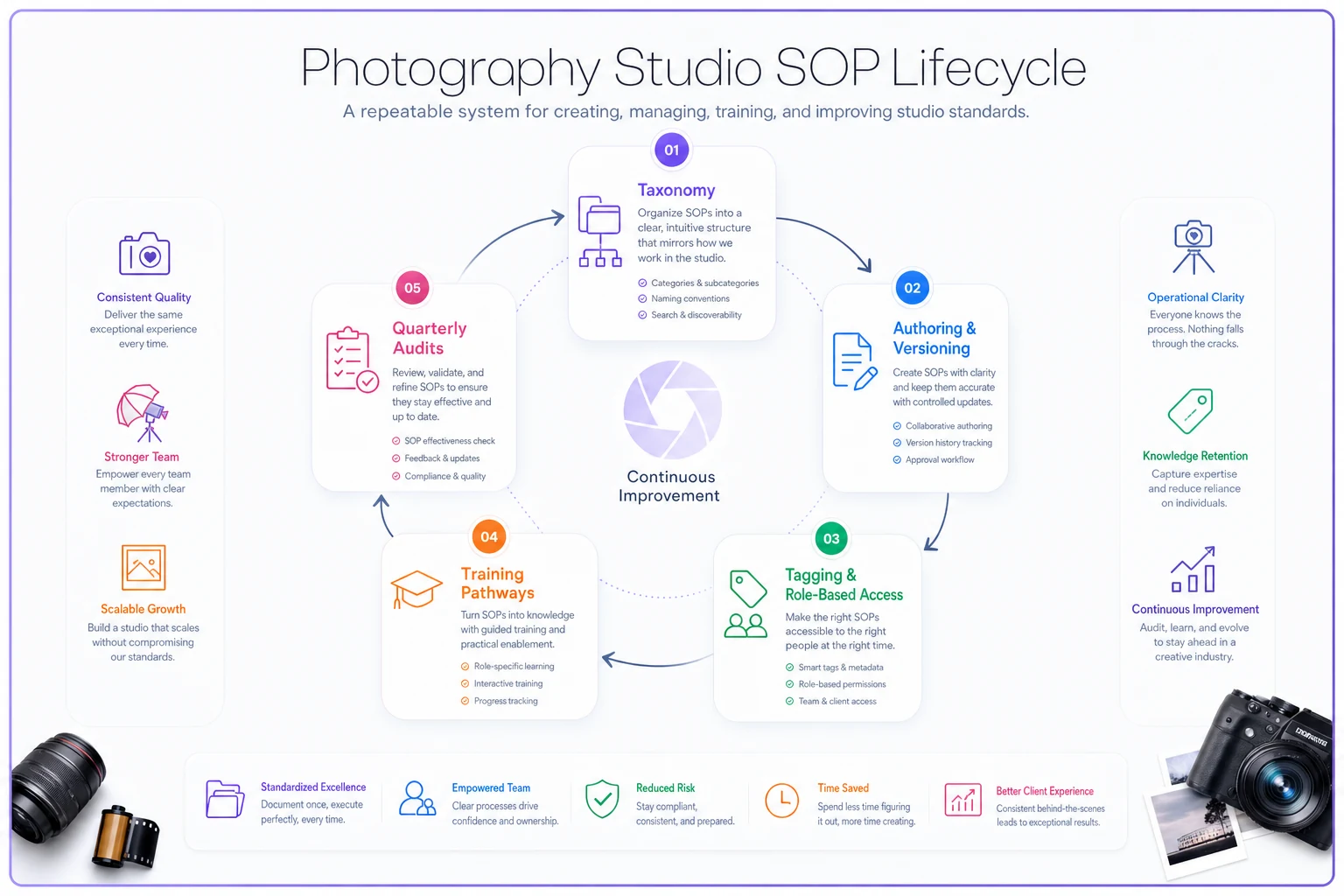
The diagram focuses on flow and ownership so you can see where a change in one area should trigger activity in another.
Taxonomy: naming and structure people can actually navigate
The fastest way to kill an SOP library is to organize it the way you think, not the way someone searches when they're stressed and mid-shoot.
The mistake that comes up constantly is folder structures built around org charts — "Photography Team," "Post-Production," "Admin." Looks tidy. Useless in practice, because real work crosses those boundaries. A newborn session touches scheduling, shooting, retouching, and fulfillment. Someone trying to find "what buffer do I leave after a newborn session" doesn't know if that lives under Scheduling or Photography.
Organize by workflow and session type first, function second. A structure that holds up as you scale looks more like this:
| Level | Example | Why it works |
|---|---|---|
| Domain | Sessions, Post-Production, Client Ops, Studio Admin | Broad, stable, rarely changes |
| Workflow | Newborn, Multi-family, Corporate Headshots, Commercial | Maps to how work actually happens |
| Procedure | Pre-session prep, Shoot checklist, Handoff spec | The atomic unit people search for |
| Asset | Templates, checklists, reference galleries | Attached to the procedure, not floating |
The key discipline: a procedure is the atomic unit. One procedure = one document = one owner. The moment you combine "everything about newborn sessions" into a 14-page mega-doc, you've guaranteed nobody reads past page two and every small update requires touching the whole thing.
Keep version numbers in metadata rather than the filename so titles remain consistent and searchable.
Naming matters more than most people realize. Adopt a boring, rigid convention and don't break it:
[Domain] - [Workflow] - [Procedure] - v[X.X]
So: Sessions - Newborn - Pre-Session Prep - v2.3. No "FINAL." No initials. No dates jammed into the title. The version number and owner live in metadata, not the filename, so you're never guessing which copy is real.
Authoring and versioning: rules that prevent quiet edits
This is where most studios fall apart, because everyone can edit everything and nobody knows what changed.
-
Minor version (v2.3 → v2.4) typo fixes, clarifications, formatting. No behavior change. Anyone with edit rights can make these.
-
Major version (v2.4 → v3.0) the actual procedure changes — a new step, a different tool, a changed spec. Major versions require owner sign-off and trigger the training pathway.
That single rule prevents the most dangerous failure mode: someone changing what people do without anyone realizing that training and downstream docs now need updating. When a retouching export spec changes, that's a major version — and it should ripple to the retouching QA and approval loop so your quality gates reflect the new standard instead of checking against a spec nobody uses anymore.
Every SOP should carry a short header block:
``
Procedure: Newborn - Pre-Session Prep
Owner: Lead Newborn Photographer
Current version: v2.3
Last reviewed: 2024-11-04
Next review due: 2025-02-04
Status: Active
`
That Status` field does more work than it looks like. An SOP is always in one of these states:
-
Draft — being written, not for use
-
Active — current, use this
-
Under review — flagged in an audit, may change soon
-
Retired — superseded, kept for reference but clearly dead
The retired state is underrated. Don't delete old SOPs — mark them retired and move them out of the active view. When a dispute comes up ("we always did it this way"), you can pull the exact version that was active on that date. That paper trail has saved studios during client disagreements and staff performance conversations more than once.
Tagging and role-based access: right document, right person
Once you're past a handful of people, "everyone can see everything" becomes a problem in both directions. Junior staff get overwhelmed by procedures that don't apply to them. And documents with sensitive content — pricing logic, vendor rates, contractor pay structures — end up visible to people who shouldn't see them.
Tagging solves the findability side. Every procedure gets a few tags beyond its taxonomy location:
-
Role tags who this applies to (Photographer, Retoucher, Coordinator, Manager)
-
Lifecycle stage tags where in the client journey it lives (Inquiry, Booking, Session, Post, Delivery)
-
Sensitivity tags Internal, Confidential, Contractor-safe
Role-based access flows from those tags. A contractor retoucher sees only what's tagged Contractor-safe and relevant to their role — the handoff spec and export standards, not your margin math or full client history. This connects directly to how you structure roles and coverage; if you've already built out a role matrix, your access tiers should mirror it exactly. The logic behind role matrices and substitution protocols is the same logic that should drive who can see and edit which SOPs.
A practical access model that scales:
| Role | Can view | Can edit | Can approve major versions |
|---|---|---|---|
| Owner / Manager | Everything | Everything | Yes |
| Lead (per domain) | Everything in domain | Own domain | Own domain |
| Staff photographer/editor | Role + workflow relevant | Suggest only | No |
| Contractor | Contractor-safe only | No | No |
"Suggest only" is the quiet hero here. Staff on the ground spot outdated steps first — they should be able to flag "this doesn't match what we actually do" without being able to unilaterally rewrite a governed document. Suggestions route to the owner, who decides if it's a minor fix or a major version. That's how you capture frontline improvements without letting the library drift.
Training pathways: turning documents into competence
An SOP nobody's been trained on is just a legal shield, not an operational tool. The library and the training system have to be wired together, or you get the classic gap: perfectly documented procedures that new hires never actually absorb.
The connection point is the major version rule. When a procedure hits a major version, it should generate a training obligation for everyone tagged to that role. Not a memo. A tracked "acknowledge and demonstrate" requirement.
-
Read the active SOPs for their role, in workflow order (booking → session → handoff)
-
Shadow a live session run by someone senior
-
Run a session under observation against the checklist
-
Calibrate — their output gets reviewed against house-style reference galleries
-
Sign off — the domain lead marks them cleared for that workflow
That fourth step matters more than people realize. Reading the SOP tells someone the steps; calibration tells you whether their output matches the standard the SOP is trying to protect. This is the same discipline that keeps quality consistent across a growing team, and it ties directly into how you hire and onboard staff without stalling growth — the SOP library is what makes onboarding repeatable instead of a founder-dependent bottleneck.
Track training status per person per workflow. A simple matrix — names down the side, workflows across the top, cells marked Not Started / In Progress / Cleared — tells you at a glance who can cover what. That same view doubles as substitution planning when someone calls in sick.
Quarterly audits: the loop that catches rot
Everything above degrades without a scheduled review. The audit is the heartbeat of the system, and it's the piece almost everyone skips because it feels like overhead.
Run it quarterly. Not annually — a year is long enough for half your high-iteration procedures to drift out of sync. Not monthly — that's audit fatigue and people start rubber-stamping.
A workable quarterly audit checklist:
-
Pull every SOP with a
Next review duedate in this quarter -
For each, the owner confirms
does this still match what we actually do?
-
Flag any procedure changed in practice but not in the doc → schedule major version
-
Check that every Active SOP has a named owner (orphaned docs are rot waiting to happen)
-
Verify retired SOPs aren't still linked from active workflows
-
Review training matrix — anyone doing a workflow they're not cleared on?
-
Spot-check access tags on anything sensitive
-
Pick 3 procedures at random and ask the person who does that task to walk through it — if their real process differs from the doc, the doc is wrong
That last one is the highest-value check in the whole system. Documents lie politely. People, when you watch them work, tell you the truth. The gap between the written SOP and what someone actually does is your rot, measured directly.
Rotate ownership of running the audit if you can. When the same person does it every quarter, they develop blind spots for the areas they originally wrote.
A real scenario
A three-photographer family studio — roughly 320–360 sessions a year — kept hitting the same wall. Whenever the owner wasn't shooting, quality slipped and revision requests climbed. Their "SOP library" was a shared drive with about 30 documents, maybe a third of them accurate.
The specific failure: their newborn safety-and-posing procedure had been informally improved twice by the lead photographer, but the written version was two iterations behind. A part-time photographer covering during a busy November followed the old doc, and three families came back for partial reshoots. Between reshoot time, extra editing, and goodwill discounts, that stretch cost somewhere in the $2k–$3k range — plus a couple of lukewarm reviews.
They spent about six weeks rebuilding: taxonomy by workflow, strict naming, owner-per-procedure, a major/minor version rule, and a training matrix. Nothing fancy — most of it lived in their existing tools, just governed properly.
Two quarters later, the substitute-coverage quality gap had mostly closed. Revision requests on covered sessions dropped to roughly what the owner's own sessions generated. Their own comment was the honest kind of win: they finally trusted that when they handed a session off, the person following the doc would produce the same thing they would. That trust — not the documents themselves — is the actual product of good governance.
When this level of governance makes sense (and when it doesn't)
It makes sense when: you have more than two or three people touching client work, you use contractors or substitutes, or you're planning to grow. The moment someone other than you delivers a session, undocumented drift starts costing money.
It's overkill when: you're a solo photographer or a tight two-person operation where both people are in constant communication. At that scale, heavy versioning and role-based access is bureaucracy for its own sake. Write down the handful of things that would break if you were sick, and stop there.
Who should NOT do this: anyone treating it as a one-time documentation project. If you're not going to run the quarterly audit, don't bother with the elaborate taxonomy — you'll just build a nicer graveyard. The governance loop is the value. A messy library that gets reviewed every quarter beats a beautiful one that's frozen the day it's finished.
Make the commitment before you build the system, or keep it intentionally small.
Where software quietly helps
You can run all of this in a shared drive and a spreadsheet. Plenty of studios do, and it's a fine starting point. The friction shows up in the maintenance — remembering review dates, routing suggestions to owners, tracking who's trained on what, keeping access tags honest as people join and leave.
That's the natural place for AI-assisted operational tools to reduce the load. A workflow platform that stamps version metadata automatically, surfaces SOPs due for review this quarter, flags orphaned documents with no owner, and nudges owners when a major version triggers a retraining obligation — that turns governance from a thing you have to remember into a process that mostly runs itself. The point isn't the software. The audit loop still has to happen; automation just makes it far less likely to get skipped when things get busy.
An SOP library isn't a documentation deliverable — it's a living system with a lifecycle, and lifecycles need governance or they decay. The studios that scale cleanly aren't the ones with the most procedures written down. They're the ones whose written procedures still match reality, quarter after quarter, because they built a loop that catches drift before it reaches a client.
Start smaller than you think. Fix your taxonomy and naming, assign an owner to every active procedure, set the major/minor version rule, and put one quarterly audit on the calendar. That's 80% of the value. Everything else is refinement — and refinement is a lot easier when the foundation isn't rotting underneath you.
Ready to elevate your studio’s workflow?
Join 500+ studios using TryPixly to save time, reduce scheduling conflicts, and deliver exceptional client experiences.