

Most studios don't lose gear catastrophically. It's slower than that. A card reader that sometimes doesn't mount. A lens that front-focuses just enough that nobody notices until a client complains. A monolight that fires 95% of the time. None of these fail loudly — they just quietly become the thing that torpedoes a Saturday when three shooters are all pulling from the same shelf.
If you run a shared gear pool across multiple photographers, the failure mode isn't "the camera broke." It's "the camera broke, and nobody knew, and it got booked out anyway, and now a photographer is standing in a client's living room with a body that won't talk to the flash." That gap — between a piece of gear degrading and your booking system knowing about it — is where no-shoot days come from.
This post is narrowly about that gap. Not general gear care. Specifically: how to tie a recurring maintenance cadence to your booking rules so that failing or out-for-service gear can't get scheduled, and so day-of failures have a triage path instead of a panic text thread.
The real problem: your calendar doesn't know your gear's health
This is the pattern in studios with 3+ shooters sharing bodies, lenses, and lighting. The booking system tracks people and rooms. It almost never tracks gear condition. So when a photographer grabs the "second 70-200" for an outdoor family session, the calendar happily allows it — even though that lens has been throwing autofocus errors for two weeks and someone made a mental note to "look at it eventually."
The mental note is the problem. Gear-pool maintenance in a photography studio falls apart the moment it lives in someone's head instead of in the same system that gates bookings.
A typical example looks like this: a studio with four photographers and two full lighting kits assumes everything works because nothing has "officially" broken. Then a busy weekend hits — six sessions across two days — and both lighting kits are booked simultaneously for the first time in a month. One kit has a modifier speedring that's been cracked since a corporate shoot three weeks ago. Nobody flagged it because there was always a spare. Except this weekend there wasn't. That's a redirect scramble at 8am on a Saturday, and it's entirely preventable.
The insight most owners miss: gear failures don't cause no-shoot days. Uncoordinated gear failures do. A single broken lens is a minor annoyance if your system knows about it 48 hours ahead. It's a disaster if it surprises you at load-out.
Build a maintenance cadence around booking frequency, not the calendar
Most maintenance schedules are time-based — "clean sensors monthly, calibrate lenses quarterly." That's fine for gear that sits. It's wrong for a shared pool where some bodies fire 800 frames a weekend and others sit in a Pelican case for a month.
Never miss a shoot or client detail again.
TryPixly helps you book, confirm, and manage every photography session seamlessly.
- Unified session and client management
- Automated client reminders
- Team calendar & resource scheduling
No credit card required
Cadence should track usage, not the wall calendar. The gear that gets hammered needs attention on a shooting-hours basis, not a "first Monday of the month" basis.
Here's a usage-tiered breakdown that actually holds up in a multi-shooter studio:
| Gear type | Trigger for maintenance check | Realistic cadence |
|---|---|---|
| Primary bodies (high rotation) | Shutter actuations / heavy weekend | Sensor + firmware check every ~15–20k actuations or every 6–8 weeks, whichever comes first |
| Workhorse zooms (24-70, 70-200) | Booked-out frequency | AF calibration check monthly if in heavy rotation |
| Lighting kits / strobes | Number of location trips | Full function test after every 3–4 location shoots |
| Modifiers, speedrings, stands | Visual + stress check | Quick inspection at every kit return |
| Cards & readers | Reformat + verify | After every job, not weekly |
| Batteries & grips | Charge cycle count | Load-test every ~40 cycles |
The point isn't these exact numbers — your rotation is different. The point is that a shared 70-200 booked 12 times a month should not be on the same maintenance clock as a backup you touched twice all quarter. When you flatten everything to a monthly calendar, you over-service the idle gear and under-service the stuff that's actually degrading.
Booking gating rules: how to make failing gear un-bookable
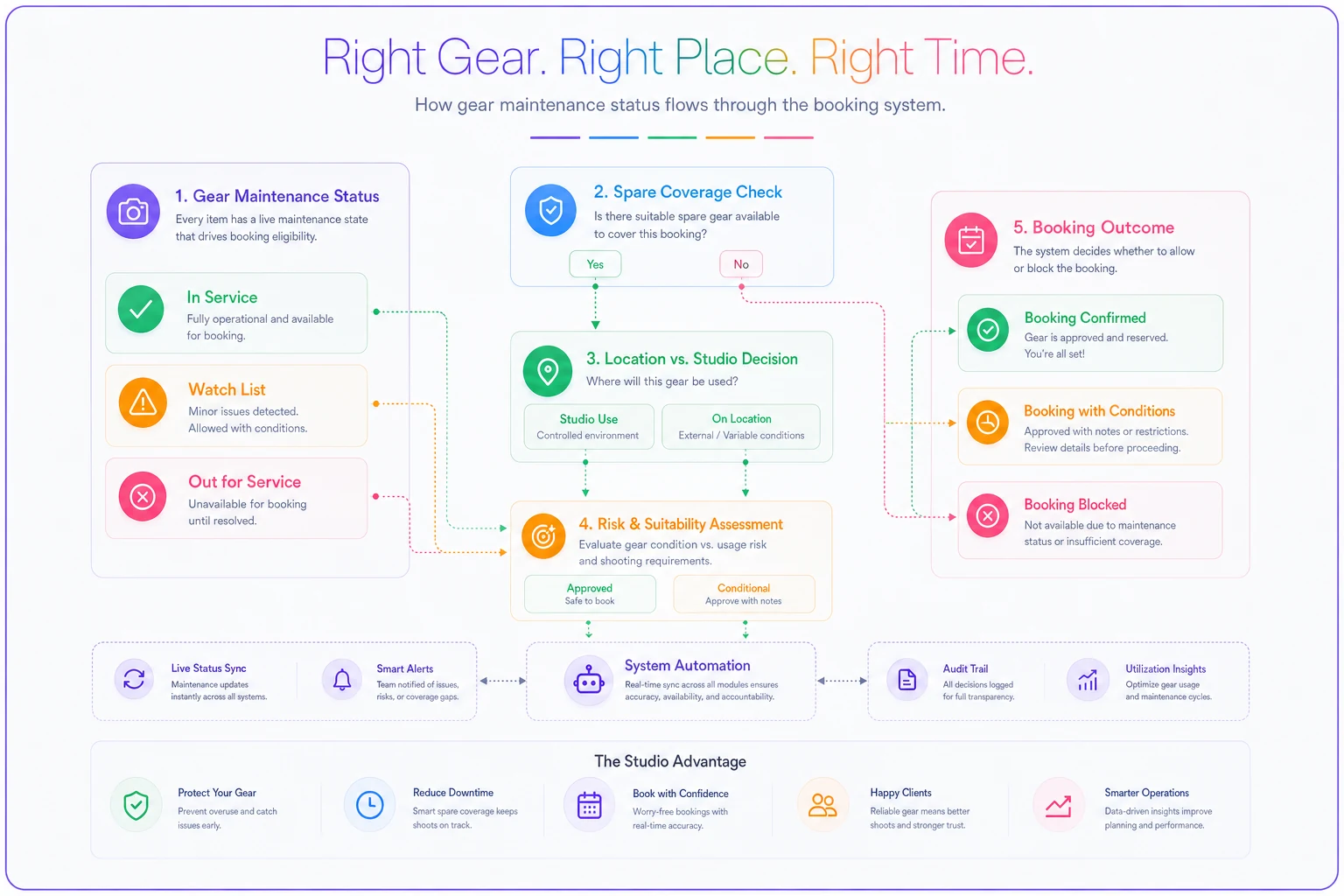
This is the core of the whole system. Maintenance status has to change what can be booked. If a lens is flagged for service, the booking flow should refuse to assign it — not warn, not suggest, refuse.
-
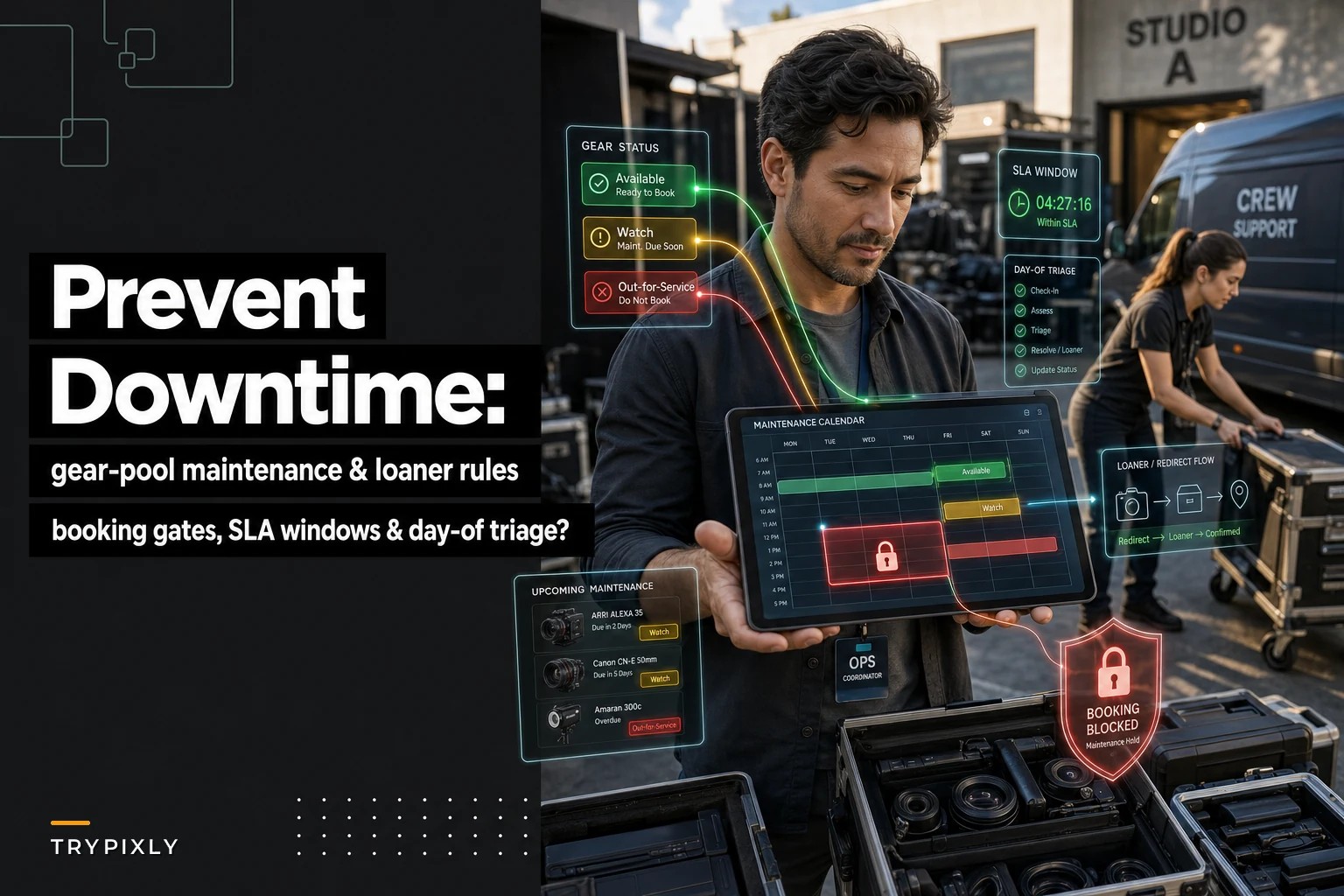
Hard block on "out for service" gear. If it's flagged, it disappears from the assignable pool entirely. No override without a manager unlock.
-
Soft flag on "watch list" gear. Items showing early warning signs — intermittent errors, cosmetic damage that could worsen — stay bookable but trigger a mandatory pre-shoot check the day before.
-
Spare-coverage rule. The system shouldn't allow both copies of a critical item (both 70-200s, both main lighting kits) to be booked simultaneously unless a third backup exists. If it would leave you with zero spare on a critical item, it flags before confirming.
-
Location vs. studio weighting. Gear leaving the building carries more risk. A location shoot should pull the higher-confidence copy of any item, and the flakier-but-functional copy stays in-studio where a swap is 30 seconds away.
That last rule is one people rarely think about. When you have two of something and one is slightly less reliable, the less reliable one should never leave the building. In-studio, a hiccup means walking to the shelf. On location, it means a ruined session.
Getting these gating rules to hold up depends on your scheduling foundation. If your booking system already enforces capacity properly, layering gear health onto it is straightforward. If it doesn't, you're bolting rules onto chaos. Same principle behind a finite-capacity scheduling system that prevents burnout and recovers lost revenue — you're just adding gear as another finite resource that can hit zero.
Keep the flakier-but-functional copy in-studio so location shoots use the higher-confidence item.
A quick visual of the gating workflow:
If your booking system already enforces capacity properly, layering gear health onto it is straightforward. If it doesn't, you're bolting rules onto chaos.
Loaner and redirect policies for when gear goes down
Even with solid gating, gear fails mid-cycle. A body that passed its check Thursday can die Saturday. So you need two policies decided in advance, not improvised at 7am.
Loaner policy. Decide before you need it:
-
Which items you keep a dedicated loaner/spare for versus which you'll rent on short notice
-
Who has authority to pull the loaner (and whether they log it)
-
Whether the loaner goes to the highest-value shoot or the first shoot to fail — these conflict, and you should know your rule
Most studios default to "whoever yells first gets the spare," which means your $400 mini-session sometimes gets the backup body while your $3k branding shoot gets left scrambling. Pick priority by revenue-at-risk, not by who noticed first.
Redirect policy. When there's no loaner and no rental time, you redirect — swap gear, swap shooter assignments, or in the worst case swap the session itself. A workable redirect ladder:
-
Swap to an equivalent in-pool item (the spare-coverage rule should mean one exists)
-
Reassign the shoot to a photographer whose kit is intact and shift the schedule
-
Rent same-day if there's a local shop and time allows
-
Contact the client to reschedule only as the last rung, with a pre-written script and a goodwill offer ready
The mistake is treating redirect as improvisation. It's a decision tree, and it should be written down the same way you'd document any recovery process. If you've built out proper role coverage and substitution protocols, redirects get much smoother — the logic for who covers what overlaps heavily with the thinking in role matrices and substitution protocols that stop quality drift.
The day-of failure triage checklist
When gear fails on shoot day, the photographer's job is to shoot, not to diagnose. Give them a short triage checklist so the decision is fast and consistent. Print it, tape it inside every kit case.
-
[ ] Confirm the failure is real (reseat lens, swap card, fresh battery — 60 seconds max)
-
[ ] Note exact symptom in one line (for maintenance later — "AF hunts wide open, fine stopped down")
-
[ ] Check if an in-kit backup covers it (second body, second lens)
-
[ ] If not covered, trigger the redirect ladder — don't keep troubleshooting
-
[ ] Message the studio channel with
item, symptom, shoot ID, time
-
[ ] Tag the item as "out for service" so it's blocked from the next booking immediately
-
[ ] After the shoot, drop the item in the designated service bin — never back on the shelf
That last step matters more than it looks. The single most common way flaky gear re-enters rotation is someone putting a "kinda works" item back on the general shelf instead of the service bin. One misplaced return and the whole gating system leaks.
SLA windows: how long can gear stay broken?
Without a service SLA, "out for service" becomes a black hole. Items sit tagged-broken for weeks because nobody owns getting them fixed, and your spare coverage quietly erodes until a busy weekend exposes it.
| Gear criticality | Target resolution SLA |
|---|---|
| Critical item with no working spare | Same day — rent or repair immediately |
| Critical item, one working spare remaining | 3–5 business days |
| Non-critical / redundant item | 2 weeks |
| Cosmetic-only issue | Next scheduled maintenance window |
The SLA does two things: it forces someone to own the fix, and it tells your booking system how long to keep the item blocked. When an item breaches its SLA, that should escalate — because a critical item down past its window is a no-shoot day waiting to happen.
A quick real scenario
A four-photographer portrait and branding studio running roughly 30–40 sessions a month kept hitting what they called "random" gear problems — a scramble every couple of weeks, occasionally a session cut short. Twice in a quarter they had to reschedule a paid shoot because a lighting kit failed on location with no covered backup. Each reschedule cost them most of a shooter's day plus an uncomfortable client conversation.
They didn't buy new gear. They changed two things: usage-based maintenance triggers instead of a monthly calendar, and a hard booking block on flagged items with a spare-coverage rule enforced before confirmation. Within about two months the mid-shoot scrambles dropped to nearly nothing, and they went a full quarter without rescheduling a single session for gear reasons. The gear was fine all along — the coordination was the fix.
When this level of rigor makes sense (and when it doesn't)
If you're a solo shooter or two people who each own and maintain their own kit, most of this is overkill. You know the state of your gear because it's yours. The maintenance-to-booking link matters when gear is shared and no single person is responsible for any given item's health.
It becomes essential around three or more photographers pulling from a common pool, especially once you're running concurrent sessions and location work. That's the point where "someone will notice if it's broken" stops being true — because everyone assumes someone else noticed.
One place where this goes wrong: don't build a heavy tracking system if you won't enforce the gating. A soft warning nobody respects is worse than no system, because it creates false confidence. Either the block is real or don't bother.
Where to keep all this so it doesn't rot
The maintenance cadence, the loaner priority rules, the redirect ladder, the triage checklist — these are SOPs, and SOPs decay the moment they live in a Google Doc nobody opens. The version that works is the one embedded where the work actually happens: the triage checklist inside the kit case, the gating rule inside the booking flow, the SLA tied to an owner and a due date.
Studios that keep this alive treat it like any other living process — reviewed, versioned, and connected to daily operations rather than filed away somewhere. If you want the broader framework for keeping operational documents from going stale, that's exactly what's covered in building a studio SOP library with lifecycle governance.
The takeaway
No-shoot days from gear failure almost never come from gear you didn't know was bad. They come from gear you did know was bad — you just knew it in a way that never reached the booking system. Close that gap. Make maintenance status change what can be booked, tie your cadence to how hard each item actually works, and write down your loaner and redirect rules before the Saturday morning when you need them.
Do that, and a dead lens becomes a shrug instead of a crisis.
Ready to elevate your studio’s workflow?
Join 500+ studios using TryPixly to save time, reduce scheduling conflicts, and deliver exceptional client experiences.