

Most studio owners don't have a process problem. They have a rollout problem.
You build a smart new booking flow, write it up, announce it in the team chat, and three weeks later everyone's back to the old way of doing things. The shoot coordinator is still texting clients from her personal phone. The second shooter still isn't logging gear returns. The retoucher is still emailing proofs instead of using the new approval tool. Nothing stuck.
This is the part nobody mentions when they publish a new SOP or buy new software. The process itself is maybe 30% of the work. The other 70% is studio operations change management — how you design the rollout, test it, train people, and measure whether it actually took hold. Get that wrong and even a solid workflow dies quietly.
What follows is a practical playbook for rolling out operational change in a studio without the usual chaos: pilot design, A/B test windows, training packets, stakeholder comms, adoption metrics, and a couple of templates you can copy. This isn't theory — it's the stuff that determines whether your next big process change becomes "how we do things now" or just another doc nobody opens.
Why new processes fail in studios specifically
Studios are a weird environment for change. You've got a core team, a rotating cast of second shooters and contractors, seasonal spikes, and work that happens half in-studio and half on-location. That mix creates failure points you don't get in a normal office.
A few patterns keep coming up:
-
The owner changes the process mid-rollout. You announce the new client intake flow Monday, tweak it Wednesday because a client complained, and change it again Friday. Nobody can adopt a moving target.
-
The people who actually do the work weren't consulted. The new editing handoff was designed by the owner, who hasn't culled a gallery in two years. The retoucher immediately spots three reasons it won't work — but only after launch.
-
Peak season swallows everything. You roll out a change in October, hit wedding/holiday season, and the team reverts to muscle memory because they're too slammed to think about anything new.
-
There's no way to tell if it's working. You "feel" like adoption is low but you have no number, so you can't tell whether to push harder, fix the process, or kill it.
The core problem: a process fails not because it's bad, but because the transition was never designed. People default to the old workflow under pressure, and if nothing measures or reinforces the new one, pressure always wins.
Pilot first — never roll out studio-wide
The single biggest mistake is launching a new process to the entire team at once. If it's flawed, you've burned trust with everyone, and you'll fight twice as hard to roll out the fixed version.
Never miss a shoot or client detail again.
TryPixly helps you book, confirm, and manage every photography session seamlessly.
- Unified session and client management
- Automated client reminders
- Team calendar & resource scheduling
No credit card required
Pilot it instead. Pick a small, contained slice of your operation and run the new process there first.
What makes a good pilot in a studio context:
-
One session type, not all of them. If you're testing a new onboarding flow, run it only on newborn sessions for two weeks — not every booking.
-
One or two people, ideally volunteers. The team member who's already annoyed by the current process will give you honest feedback and actually try to make it work.
-
A defined window with a start and end date. Open-ended pilots never end. "We'll try it for three weeks" forces a decision.
-
A clear success definition written down before you start. "Fewer than two client confusion emails per session" beats "see how it goes."
A typical example: a studio wanted to switch from scattered email threads to a structured consult-to-booking flow. Instead of flipping everyone over at once, they piloted it on corporate headshot inquiries only — roughly 15–20 inquiries over three weeks. They caught two broken steps and one confusing client-facing message before it touched their higher-volume family work. By the time it went studio-wide, the kinks were gone and the team trusted it.
Pilots also protect your client experience. A broken process in a small pilot annoys a handful of people you can personally follow up with. A broken process at full scale shows up in your reviews.
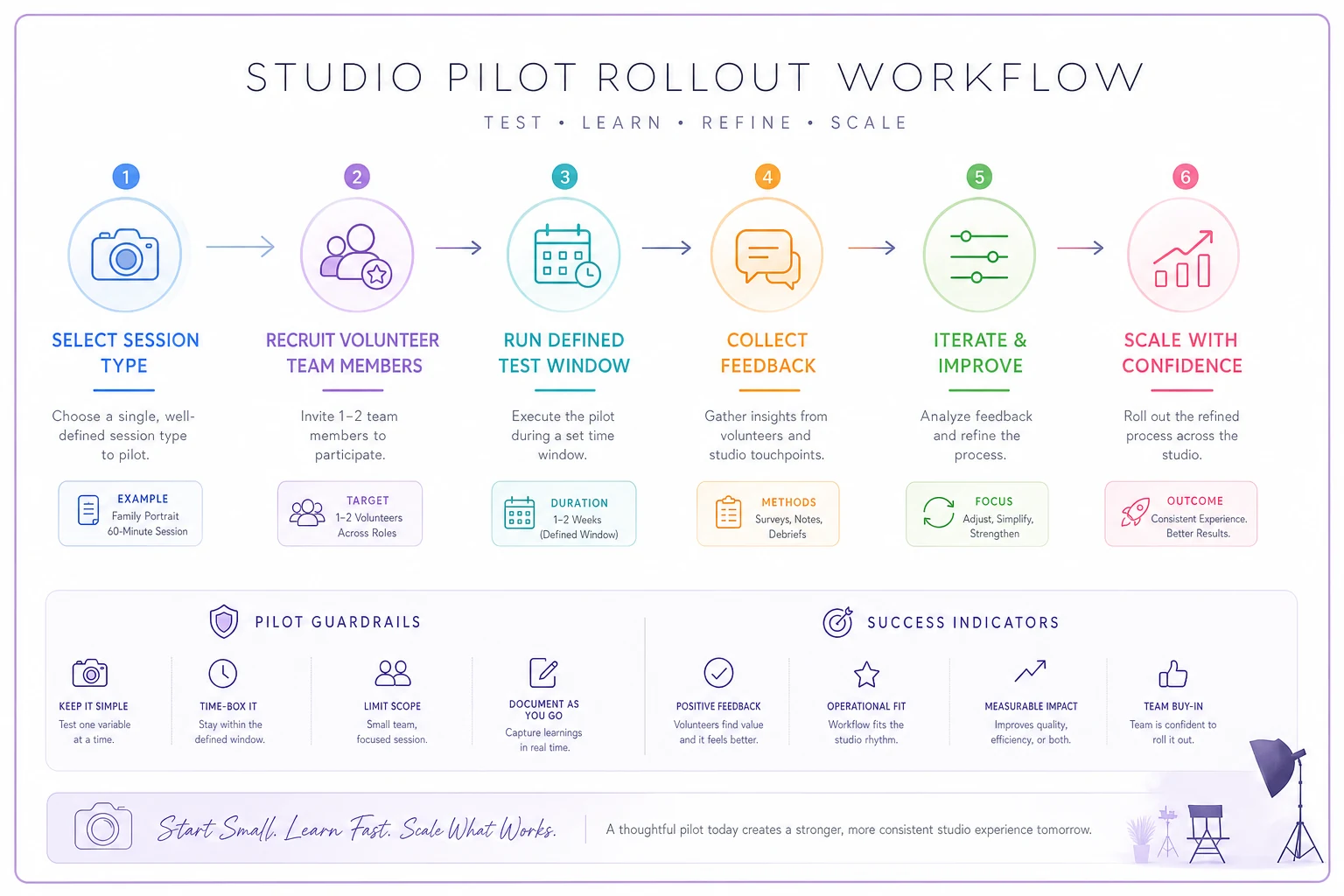
This simple flow helps you find and fix the problems before they touch most of your clients.
Recruit volunteers by asking who is most frustrated with the current process; they'll give honest feedback and help surface real pain points during the pilot.
Pilots also make it easier to follow up personally with any clients who had a rough experience, protecting your reviews and relationships.
Use A/B windows to actually prove the new process is better
"The new way feels faster" is not evidence. Feelings are unreliable for this, especially for the owner, who's emotionally invested in the change working.
If you want to know whether a new process is genuinely better, run it against the old one in parallel for a set window.
How an A/B window works in practice:
-
Group A keeps the current process (your control).
-
Group B runs the new process.
-
You split by something clean — session type, day of week, or which coordinator handles it.
-
You pick 2–3 metrics up front and measure both groups over the same window.
Say you're testing a new gallery delivery and ordering flow. For four weeks, half your sessions get the old delivery email, half get the new structured flow. You compare:
| Metric | Group A (old) | Group B (new) | What it tells you |
|---|---|---|---|
| Avg days to client order | 9 days | 5 days | New flow moves people faster |
| % sessions with a print/album order | ~40% | ~55% | New flow lifts AOV |
| Client "where's my gallery" emails | 1.3 per session | 0.4 per session | New flow reduces confusion |
| Team time per delivery | 22 min | 14 min | New flow saves labor |
Now you're not guessing. If Group B wins across the board, roll it out with confidence. If it only wins on one metric and costs you somewhere else, you've learned something important before committing the whole studio.
One caution: don't run A/B windows during your weirdest weeks. Testing a new flow in the middle of your busiest holiday stretch gives you data that won't generalize to a normal month. Pick a representative window.
Build a training packet people will actually use
Most studio "training" is the owner demoing something once on a Tuesday while three people half-watch between edits. Two days later, nobody remembers it.
A training packet fixes this. It doesn't need to be fancy — it needs to be referenceable when someone's confused at 7pm on a shoot day and you're not around.
A usable studio training packet includes:
-
A one-page "why this changed" explainer (the reason matters more than the steps — people follow processes they understand)
-
The step-by-step workflow, written the way the task actually happens, in order
-
Screenshots or a short screen recording for anything software-related
-
A brief list of the top 3–4 edge cases and what to do when they come up
-
Who to ask when the packet doesn't cover it
Keep it skimmable. Nobody reads a 12-page manual. The best packets fit the core workflow on a single page, with detail tucked underneath for whoever needs it.
One pattern worth stealing: pair the packet with a calibration session where the team runs the new process on a fake or past job before it touches real clients. This is the same logic behind using calibration sessions to stop quality drift across multiple photographers — you want everyone doing the new thing the same way from day one, not inventing their own version of it.
Stakeholder comms: tell people what's changing and why, repeatedly
Change dies in the gap between "the owner knows the plan" and "the team knows the plan." You've been thinking about this new process for weeks. Your team heard about it for the first time in a two-line Slack message this morning.
Good comms for a studio rollout isn't complicated, but it has to be deliberate:
-
Announce before launch, not at launch. Give people a heads-up a week out so the change doesn't feel sprung on them.
-
Explain the problem it solves, from their perspective. "This cuts the back-and-forth that eats your Friday afternoons" lands better than "we're improving efficiency."
-
Say exactly what changes for each role. The coordinator, the shooter, and the retoucher each need to know their part — not the whole system map.
-
Repeat it. People need to hear a change three or four times before it registers. One announcement is not comms.
-
Create a feedback channel. When someone hits a snag, they need somewhere obvious to flag it — otherwise they just quietly go back to the old way.
The hidden cost of bad comms is contractors. Your core team eventually absorbs change through sheer repetition, but rotating second shooters and editors miss the memo entirely because they weren't around when you announced it. That's often where the new process quietly breaks — not with staff, but with the people on the edges of your team. If your contractor relationships are already loose, the staffing and onboarding systems that keep your talent aligned matter just as much as the process itself.
Measure adoption, not just rollout
The trap: you launch the new process, people seem to use it for a week, you declare victory, and stop paying attention. Then it decays.
Rollout is an event. Adoption is a trend. You need to watch the trend.
Adoption metrics worth tracking:
-
Usage rate — what % of eligible sessions actually went through the new flow this week? (If it's a software change, you can often pull this directly.)
-
Drop-off point — where in the process do people abandon it? If everyone completes steps 1–3 but skips step 4, step 4 is broken, not your team.
-
Exception volume — how often is someone working around the process? High workarounds mean the process doesn't fit reality.
-
Time-to-steady-state — how many weeks until usage flattens at a high, stable number? If it never flattens high, the rollout failed even if launch went fine.
A realistic adoption curve looks something like this: week one, usage jumps to maybe 70% out of enthusiasm. Week two it dips as the novelty wears off and pressure kicks in. If you do nothing, it keeps sliding. If you check the number, spot the dip, and reinforce — a quick reminder, fixing the one step everyone complained about — you can usually pull it back up and hold it there.
100% | | ● 85% | ● ● ● ● ● | ● ● 70% | ● | 50% | (if you do nothing) | ● 30% | ● +--+--+--+--+--+--+--+-- 1 2 3 4 5 6 7 8 (weeks) — With reinforcement at week 2–3, adoption stabilizes ~85% — Without reinforcement, it slides to 30–40% by week 6
The studios that get this right treat adoption like a dashboard metric, not a one-time launch. And if your new process involves an SLA or handoff change, watch it the same way you'd watch delivery promises — the logic in an inquiry-to-delivery SLA playbook applies here too: what you don't measure, you can't defend.
A real scenario: a two-shooter studio rolling out a new editing handoff
A small family-and-newborn studio — two primary shooters plus one outside retoucher — had a messy editing handoff. Galleries were getting culled inconsistently, files were named three different ways, and the retoucher spent time hunting for selects. Turnaround was dragging past three weeks.
The owner designed a new handoff: standardized culling, one naming convention, a single shared folder structure. Instead of announcing it to everyone at once, she piloted it on newborn sessions for two weeks — about eight sessions. The retoucher flagged that the folder structure didn't account for client-favorite flags, so they fixed it mid-pilot.
Then they ran a rough A/B window: newborn sessions on the new flow, family sessions on the old one, for a month. New-flow sessions averaged around 11–12 days to delivery versus roughly 19 on the old flow. Rework requests from the retoucher dropped because files arrived clean.
By the time it went studio-wide, the training packet was one page, the team had already run it on real jobs, and adoption held above 85% because everyone had seen the before-and-after for themselves. The whole thing took about six weeks start to finish — slower than a same-day announcement, but it actually stuck. Which the three previous "improvements" hadn't.
When this heavier rollout process makes sense — and when it doesn't
Not every change needs a pilot and an A/B window. That's overkill for small stuff.
Use the full playbook when:
-
The change touches the client experience directly
-
It affects multiple roles or hands off between people
-
It involves new software or a tool switch
-
A failed rollout would cost you money or reviews
-
You've tried to change this same thing before and it didn't stick
Skip the formality when:
-
It's an internal tweak only you touch
-
It's low-stakes and easily reversible
-
It's genuinely urgent and you can clean up later
Who should NOT do this: solo photographers with no team. If you're the only person doing every step, you don't need stakeholder comms with yourself — just change it and move on. This playbook earns its weight the moment you have two or more people who have to coordinate.
Sample pilot template you can copy
A bare-bones pilot plan you can fill in for any process change:
-
What we're changing _
-
Why (the problem it solves) _
-
Pilot scope which session type / how many sessions / which people
-
Pilot window start date → end date
-
Success looks like 2–3 specific, measurable outcomes
-
What we're measuring metric 1, metric 2, metric 3
-
Who's running it _
-
Feedback goes to _
-
Decision date when we decide to roll out, fix, or kill it
And a lightweight adoption check you can run weekly after rollout:
-
% of eligible jobs using the new process this week
_
-
Where people are dropping off
_
-
Number of workarounds / exceptions logged
_
-
One thing to fix before next week
_
Print these. Fill them in by hand if you have to. The point isn't the format — it's forcing yourself to define success and measure it before you declare the rollout done.
The real takeaway
The studios that successfully evolve their operations aren't the ones with the best ideas. They're the ones who treat each change as a project with a design, a test, and a measurement — instead of an announcement they hope people follow.
Good studio operations change management is mostly just refusing to skip steps: pilot before you scale, prove it with real comparison, train in a way people can reference later, communicate more than once, and watch the adoption number until it holds. It's slower than firing off a Slack message. It's also the difference between a process that becomes "how we do things" and the quiet graveyard of good ideas nobody uses anymore.
Next time you've got a change you're excited about, resist the urge to roll it out to everyone Monday morning. Pilot it on one corner of your studio first. You'll find the problems while they're still cheap to fix — and you'll end up rolling out something your team actually keeps using.
Ready to elevate your studio’s workflow?
Join 500+ studios using TryPixly to save time, reduce scheduling conflicts, and deliver exceptional client experiences.